Terraform is one of the most proficient tools meant for building, versioning, and changing existing or new infrastructure efficiently. It is designed to manage modern and existing cloud service providers along with in-house cloud solutions.
It functions by generating an execution plan first, following which it commences with the implementation functions or commands to reach the desired state. With the changes coming up later in the configuration, Terraform identifies them and modifies the execution plans accordingly for further application.
What is Terraform? Read TERRAFORM TUTORIAL and understand it in 30 Minutes!
Terraform can be integrated with both AWS and Azure to derive distinct benefits from each of them. Enterprises and budding entrepreneurs are already aware of all the buzz going on about Terraform. In order to help give them more clarity, this blof is focusing on the integration potential of Terraform with AWS and Azure. Follow on to the content below to get an in-depth understanding of how Terraform works with AWS and Azure.
What is Terraform with AWS and Azure
Terraform is HashiCorp’s open-source infrastructure-as-code tool that lets you define, provision, and manage cloud resources through simple, human-readable configuration files instead of manual clicks in a console.
When paired with AWS, Terraform lets you codify everything from EC2 instances to entire Service Catalogue products, giving teams a consistent, version-controlled way to manage AWS infrastructure at scale.
On the other hand, Terraform with Azure works much the same way, replacing traditional ARM templates to provision resources like virtual machines and app services, and it fits naturally into CI/CD pipelines through tools like Azure Pipelines.
Terraform with AWS and Azure: in both cases, the core workflow is the same. Terraform inspects your configuration, builds an execution plan, and then applies exactly the changes needed to bring your infrastructure to the desired state, making it one of the most reliable ways to manage cloud environments across providers.
Terraform with AWS
AWS CloudFormation & Terraform offer services for coding and managing infrastructure resources with proper programming. But most of the enterprises today have mastered Terraform and have integrated it with AWS to manage all of their AWS resources. Terraform can be used for controlling AWS resources with an ideal programming approach.
Following on from that, there are certain steps that you need to follow for creating a CloudFormation registry resource type, especially for Terraform, and continue with its deployment as a product of AWS Service Catalogue.
Working Methodology of Terraform with AWS
At first, AWS CloudFormation approaches this by codifying the infrastructure details into the proper configuration. This process of creating the configuration file with proper coding of infrastructure is referred to as a template within the service execution.
Terraform is a type of resource for AWS CloudFormation and is not on the supported list of AWS. Therefore, you will have to create an initial registry resource for the same. And for that, you might have to use the code Cloudsoft:: Terraform:: Infrastructure. This command is destined to help you communicate with the server of Terraform through a secure networking protocol.
Cloudsoft is considered an APN (AWS Partner Network) and a consulting partner with AWS DevOps. There are certain types of information that you must have on hand before you can commence with the setup of your registry resource. The types of information include:
- Terraform IP Address or DNS Hostname
- SSH KeyPair
- SSH Port
- SSH username
- SSH private client key
- SSH server public key fingerprint
These are some of the things you need to obtain before you can know how to integrate Terraform in AWS. The AWS CloudFormation template is meant to behave like a proxy for Terraform. The command called for communicating with the Terraform server is CloudFormationRegistry Cloudsoft:: Terraform:: Infrastructure.
On calling this command and initiate the setup, the architecture will appear as shown in the diagram below.
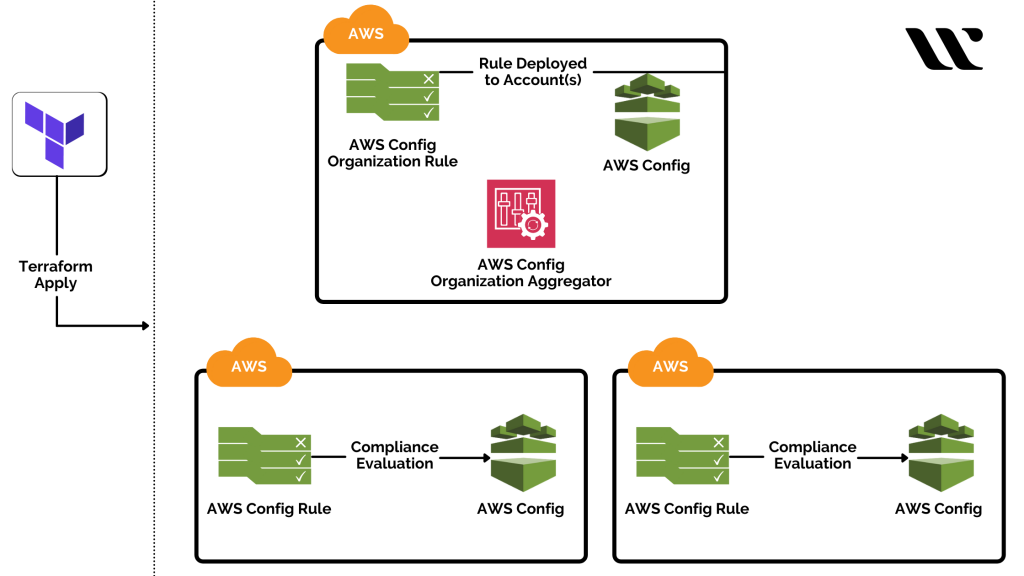
After the solution enters the deployment phase, Terraform and CloudFormation files are stored within an Amazon S3 Bucket. Once it is done, you can now launch the wrapper files associated with CloudFormation and implement them for the creation of products associated with the AWS Service Catalogue.
With the above command, CloudFormation communicates with the Terraform server for managing the AWS resources, and the activity is logged to the Amazon S3 Bucket. For your clarity, here are the three brief steps that you must follow to add Terraform to AWS CloudFormation as a custom resource:
Step 1: Ensure that the Terraform server is active and available at the moment.
Step 2: AWS Identity and AIM roles are to be created.
Step 3: Cloudsoft Terraform Resource needs to be installed.
Now, you have got your custom AWS CloudFormation resource created for Terraform. With it, you can control the public and on-premises cloud resources with ideal measures. In this way, Terraform gets integrated and can be used with AWS.
Terraform with Azure
Terraform has been a very commonly talked-about topic amongst the DevOps community. The best part of Terraform is that it supports diverse cloud providers, and Azure is one of them! Many enterprises are moving to Azure for most of their deployments, and with the era of Terraform, the ARM templates are getting replaced for good.
There are many concepts within the integration of Terraform with Azure that are yet to be unveiled. But, with the concepts in play, you can conclude the efficacy of this combination. If you wish to know how to integrate Terraform in Azure, then follow the working methodology associated with it.
Working Methodology of Terraform with Azure:
The working methodology of Terraform with Azure will explain to you the right way of integrating Terraform, an open-source tool, to implement IaC on Azure. Along with that, you will also get to know the different steps associated with automating infrastructure deployments in the cloud in collaboration with Azure Pipelines and Terraform.
The steps include:
Step 1: Examine or Inspect the Terraform file in the Source Code
Under this step, you need to examine the Terraform file that will help you proceed with the provisioning of Azure resources that will be essential for you to deploy the application or website. The Terraform file comes with the ‘.tf’ extension, and this format is defined by HashiCorp itself, named HCL (HashiCorp Configuration Language).
Step 2: Building the Application with Azure CI Pipelines
After you have inspected the Terraform file, it’s time to proceed with the building operations essential for the application. For that, you need to access the Terraform-CI portal and edit it as necessary. The pipeline you build will have certain tasks that are to be compiled, thereby restoring the dependencies. Following that, it will build, test, and publish the application or output in the form of a zip package or file for further processing as a web application.
After the application is built, you will have to publish the Terraform files for building the artefacts to make them available within the CD pipeline. You can simply execute the ‘Copy files’ task to copy the Terraform files into the directory. Cross-check for the presence of Terraform folders within artefacts and the zip file within the drop.
Step 3: Deploy the Resources using Terraform in Azure Pipeline (CD)
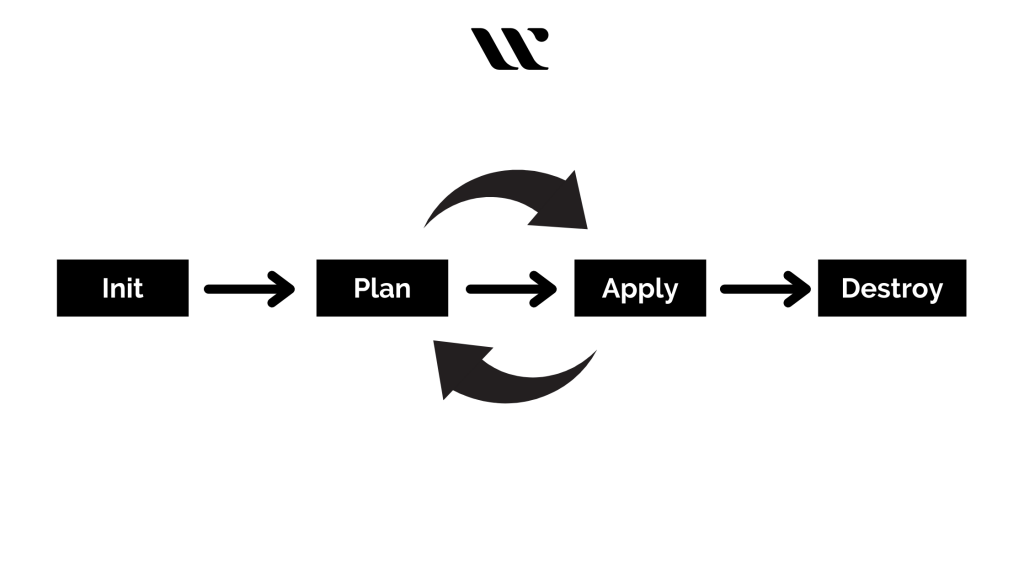
In this step, you will be able to create and deploy the Azure resources by implementing the use of Terraform. Along with that, you will also be deploying the built application or website to the provisioned app service set up by Terraform.
The Terraform workflow commences with the initialisation of the working directory. Following this, it produces a plan for changing the optimal resources to get it streamlined with the existing configuration. Now, the changes will be applied as per the prepared plan by Terraform.
By executing the ‘terraform init’ command, the tool will look for all the ‘.tf’ files within the directory and will automatically download the providers essential for them. When you are working to deploy the Azure resources, this command will automatically download the Azure provider. Now, the ‘terraform plan’ and ‘terraform apply’ commands will be used to plan and deploy the Azure resources.
Check out TERRAFORM CHEAT SHEET, they might be useful if your deep diving into Terraform
Comparison Between Terraform Integration with AWS and Azure
Criteria Comparison |
Terraform with AWS |
Terraform with Azure |
| Virtual Machine Creation | Easy without the need for a VPN or resource groups. | Azure CLI needs to be installed to set up a VM in Azure. |
| Resource Group | It has recently added the concept of the resource group, which is not concrete but is used for listing selected resources based on tag values and keys for defining the resource group. | Strong resource group concept for creating cloud resources. |
| Number of resource groups defined | 5 distinct resource groups are called. | One main resource group is called. |
Conclusion
We have here walked you through how to integrate Terraform with AWS and Azure, so you can deploy resources on either platform with confidence and put this powerful infrastructure-as-code tool to real use. Today, most organisations operating in the cloud are turning to Terraform for their deployments precisely because it delivers better performance, consistency, and reliability across environments, and multi-cloud fluency is quickly becoming a genuine career advantage.
If this has you thinking about validating that skill, the HashiCorp Certified Terraform Associate certification is the natural next step. Start with our free test today to see where you stand. Beyond the certification itself, Whizlabs offers hands-on labs where you can practice these exact AWS and Azure integrations in a live environment, along with a full Terraform course to help you connect what you’ve read here to real, working infrastructure.
Implement Terraform with AWS or Azure today and see the benefits for yourself. Whether you’re here to solve an immediate deployment problem or to build toward a certification, this is a solid foundation for a career built on Terraform. Start now, and keep building from here.
Reach out to us at [email protected], if you need personal assistance in choosing your certification or upskilling journey. We’re happy to help you figure out the right path forward.

- Why Cloud Architects Need Multi-Cloud Certs in 2026 - May 25, 2026
- How AI and Automation Help AWS SAP-C02 Architects in 2026? - January 2, 2026
- How to Prepare for the VMware VCP‑DCV Certification in 2025? - August 12, 2025
- What are the Key Model Deployment Strategies for AIF-C01? - February 26, 2025
- How I Passed AWS SAA-C03 Exam: My Study Plan and Mistakes - September 9, 2024
- What Are The Best Careers With AWS Cloud Practitioner Certification? - January 23, 2024
- Terraform with AWS and Azure: Integration Guide & Comparison - April 17, 2021
- AWS DOP-C02 Exam Guide: How to Prepare for AWS Certified DevOps Engineer Professional Exam - September 17, 2018