

Generative AI on Azure: What Every Cloud Engineer Needs to Understand
Generative AI did not send a calendar invite. It just showed up. If you already understand Azure, Generative AI for Azure cloud engineers is the next layer.
Azure OpenAI Service is now one of the fastest-growing managed services on the platform. Microsoft Copilot is enabled across millions of organisations. RAG-based applications are landing in production environments every week, which are built on Azure infrastructure, managed by Azure engineers, often before those engineers have had a clear explanation of what they are actually running.
That gap is real. And it is not a knowledge problem, but a timing problem. The technology moved faster than the curriculum did.
According to the World Economic Forum’s Future of Jobs Report 2025, AI and data literacy are now the fastest-growing skill priorities globally, cited by 86% of employers surveyed. For cloud professionals, that shift is not coming. It has already arrived. It is visible in job descriptions, in team conversations, and in the services landing inside Azure environments that nobody formally announced.
This guide closes that gap on what generative AI is. How does it differ from the automation you already work with? How do Azure OpenAI, Copilot, RAG, and Azure AI Foundry connect into a single coherent stack? And what all of it means for your role as an Azure engineer?
Let’s get it started.
What Is Generative AI?
Generative AI is a class of AI systems that produce new content such as text, code, images, summaries, and translations in response to input. That is the definition. But definitions rarely do the work on their own. So here is the version that makes more sense if you have spent years working with Azure services.
If you understand how an API works, a request goes in, a response comes back; you already understand the fundamental interaction model of generative AI. The difference is what happens between the request and the response.
In a traditional API, logic executes. In a generative AI system, a model generates. The intelligence is not in the code connecting the request to the response. It is in the model that produces the response.
Generative AI for an Azure cloud engineer, this translates into something practical. When your organisation deploys an Azure OpenAI-powered application, the model GPT-4, for example, lives inside Microsoft’s infrastructure, managed by Microsoft, updated by Microsoft.
Basically, what you manage is everything around it. The service configuration. The access policies. The network integration. The monitoring. The cost controls. The governance of what data is allowed to enter and exit the system.
This is a mental model worth holding onto throughout this guide.
The Three Layers of Generative AI for Azure Engineers
Before we move further, let me add one other thing. Generative AI does not think. It does not understand. It generates responses that are statistically likely to be correct based on patterns in its training data.
This matters operationally because it means outputs can be plausible and wrong, confident and inaccurate, fluent and incomplete. The governance and monitoring disciplines that surround these systems exist precisely because of this characteristic. The engineer’s job is not to trust the model. It is to govern the environment in which the model operates.
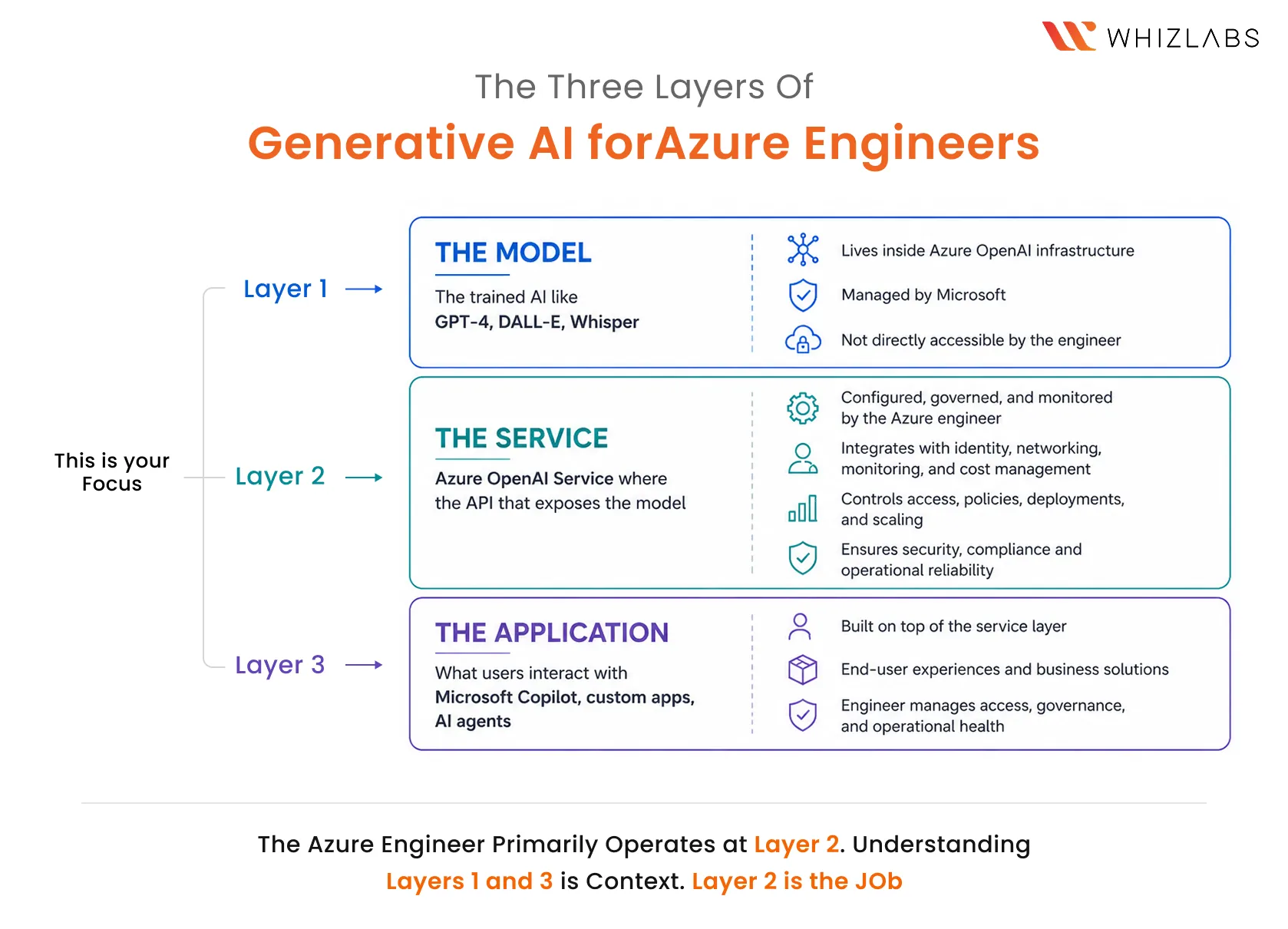
Understanding that distinction changes how you think about every AI service covered in the rest of this guide.
How Generative AI Is Different From Automation?
Understanding what generative AI has become is more useful when you understand what it is not. Most Azure engineers have worked with automation in some form: Logic Apps, Azure Automation, Power Automate, and custom scripts. The intuition that generative AI is “smarter automation” is understandable. But it’s also wrong in a way that matters operationally.
Automation executes defined logic. You write the rules. If condition A is true, execute action B. The output is determined; given the same input under the same conditions, the system produces the same output every time, because you wrote what it should do.
Generative AI generates probable responses. It does not follow a rule you wrote. It produces what is statistically likely to be the right answer for the given input and the patterns in its training. The same prompt, submitted twice, may produce slightly different responses. The system can produce outputs that are confidently wrong. It can generate answers to questions you did not ask. It can refuse to generate content that falls within its safety filters even when the intent is legitimate.
None of this makes generative AI less useful. It makes it different, and that difference changes what the engineer needs to do.
Generative AI vs Automation Azure
| Traditional Automation | Generative AI | |
| Logic | Rule-based, deterministic | Probabilistic, generative |
| Output | Defined by the engineer | Generated by the model |
| Same input, same output? | Always | Not guaranteed |
| Failure mode | Breaks on undefined input | Produces plausible but wrong output |
| What engineer governs | Rules, triggers, error handling | Access, prompts, outputs, monitoring |
| Azure example | Logic Apps, Azure Automation | Azure OpenAI Service |
This distinction has a direct operational consequence.
When a Logical Application fails, it fails visibly: a broken trigger, a failed action, an error log with a clear cause.
When a Generative AI application produces a wrong answer, it may not look like a failure at all. The response is fluent, formatted correctly, and confidently stated. The only way to catch it is to have monitoring and evaluation systems that check outputs, not just availability and error rates.
This is why supporting AI-powered applications on Azure is genuinely different from supporting rule-based workflows. Not necessarily in a harder sense. But different. And the engineer who understands the difference is the one who builds the right monitoring architecture before the first production incident, rather than after it.
When a Logic App fails, it fails visibly. When a generative AI application produces a wrong answer, it may not look like a failure at all. That difference changes everything about how you monitor it.
The Azure AI Landscape: How Do All the Services Connect?
Now that you understand what generative AI is and what makes it operationally different from automation, here is where it lives in Azure, and why most engineers find it confusing at first.
Microsoft has released a significant number of AI-branded services in a short period. Azure OpenAI. Azure AI Foundry. Microsoft Copilot. Copilot Studio. Microsoft 365 Copilot. Security Copilot. Each one with its own documentation, its own admin centre, its own audience. And Microsoft uses the word “Copilot” for at least four different products, which makes an already crowded landscape harder to read.
The confusion is understandable. But the architecture has a logic.
Once you see the layered structure underneath all of these services, the confusion resolves, because the services are not competing with each other. They occupy different layers of the same stack, each one building on what sits below it.
THE MICROSOFT AI STACK: FROM FOUNDATION TO USER
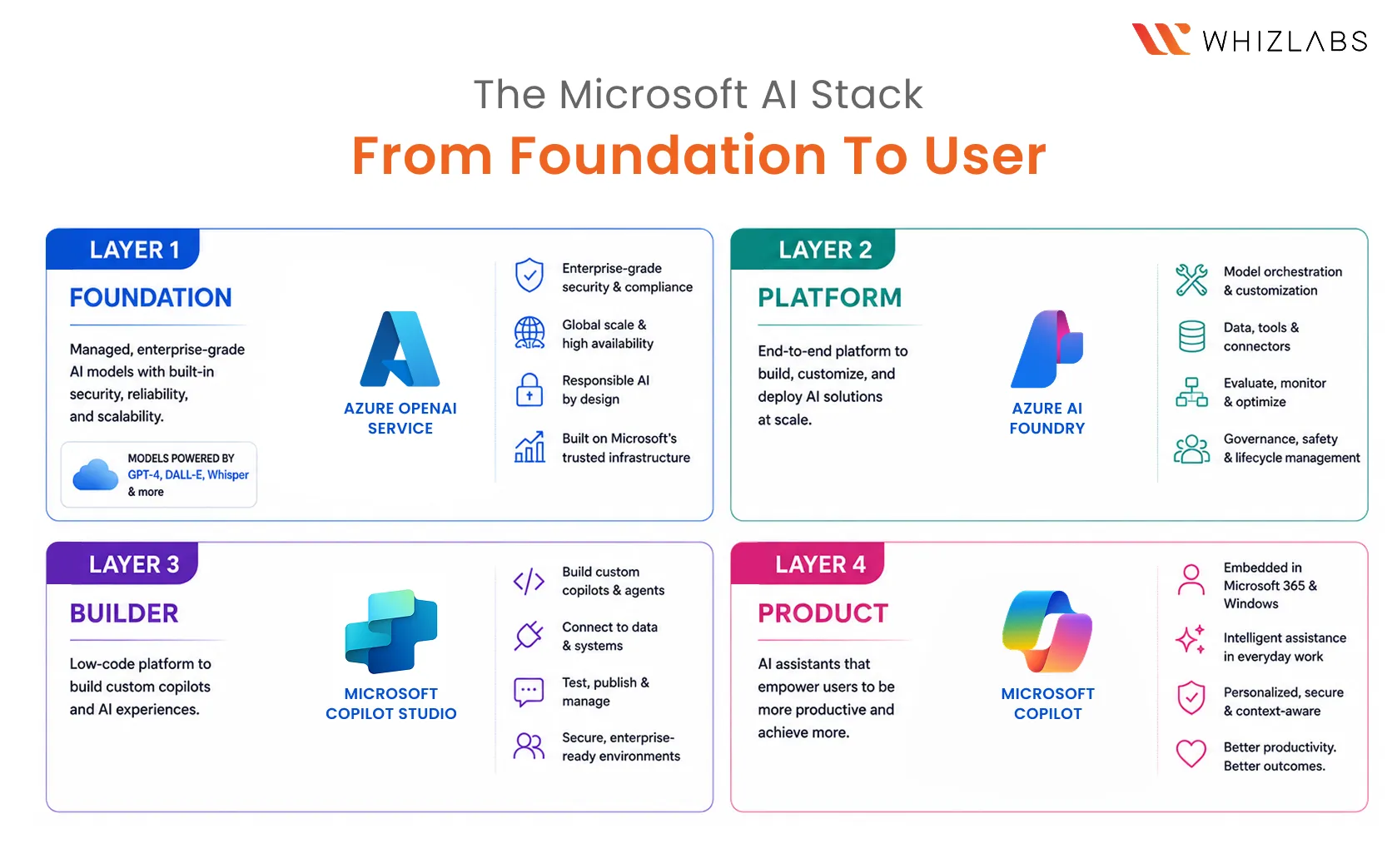
LAYER 1: FOUNDATION Azure OpenAI Service
The API that exposes large language models such as GPT-4, DALL·E, and Whisper inside the Azure infrastructure. Every other AI product in the Microsoft ecosystem ultimately connects to this layer.
Engineer manages: model deployment, access control, network integration, monitoring, and cost governance.
↓
LAYER 2: PLATFORM Azure AI Foundry
The operational control plane for enterprise AI. Where you manage model selection from the catalogue, configure RAG pipelines, handle fine-tuning, provision compute, and evaluate AI application quality before and after deployment.
Engineer manages: model selection, deployment pipelines, data source connections, evaluation, and compute scaling.
↓
LAYER 3: BUILDER Microsoft Copilot Studio
The platform for building custom AI agents and copilots, specific to your organisation’s workflows, knowledge, and processes. No code required to build. Significant operational discipline is required to govern.
The engineer manages: agent governance, approval workflows, security controls, integration with enterprise systems, and monitoring.
↓
LAYER 4: PRODUCT Microsoft Copilot
A general-purpose AI assistant for personal productivity, Microsoft 365 Copilot is an AI embedded in Teams, Word, Excel, Outlook, and PowerPoint. Microsoft Security Copilot is also an AI for security operations, threat analysis, and incident response.
The engineer manages: licensing, permissions, data governance, sensitivity labels, access controls, and what each product can see.
This structure matters for a reason beyond clarity.
Every layer inherits the security posture, permissions, and data governance of the layers beneath it. Governance starts at the foundation, not at the product.
Every layer inherits the security posture, permissions, and data governance of the layers beneath it. If your Azure OpenAI Service deployment is not properly scoped, if access controls are too broad, if network restrictions are missing, if audit logging is not configured, that gap does not stay contained to Layer 1. It surfaces in every product that runs on top of it.
This is why governance starts at the foundation, not at the product. An engineer who understands only the Copilot admin centre without understanding the Azure OpenAI Service and Azure AI Foundry layers underneath is managing the surface without managing the system.
The rest of this guide goes deeper into each layer, starting with the one most Azure engineers encounter first.
Azure OpenAI Service: What is the Engine Underneath?
Before we go deep, let me answer: What is Azure OpenAI Service?
Azure OpenAI Service is a managed API service from Microsoft that exposes large language models, including GPT-4, DALL·E, and Whisper, inside Azure infrastructure. It is not a standalone product or chatbot. It is a PaaS resource that applications connect to via API, managed like any other Azure service: with resource groups, role-based access control, network configuration, monitoring, and cost governance.
It is an API endpoint, an address that applications send requests to and receive generated responses from. Everything built on Microsoft’s AI stack, from Microsoft 365 Copilot to a custom enterprise application, connects to the models it exposes through this service layer.
For an Azure engineer, this framing changes everything about how you approach it. Azure OpenAI Service is not an AI product that sits outside your operational responsibility. It is a PaaS resource like Azure App Service, Azure SQL, or Azure Kubernetes Service. It lives inside a resource group, connects to your identity infrastructure, sits on your network, and generates costs against your subscription.
Intelligence lives in the model. Your responsibility is everything around it.
What does an Azure engineer manage in Azure OpenAI Service:
-
Deployment
Azure OpenAI does not give you vague access to a model. You provide a deployment, which is a named instance of a specific model, with a quota allocation, inside an Azure OpenAI resource. So basically here, managing deployments means understanding which model versions are available, how quota is allocated across teams, and when to scale or adjust deployments as usage changes.
-
Access control
Azure OpenAI uses Azure Active Directory (Microsoft Entra ID) for authentication. Access is managed through role assignments such as Cognitive Services OpenAI User and Cognitive Services OpenAI Contributor. They are applied at the resource or resource group level. Getting this right is the same discipline as any other Azure RBAC configuration. Getting it wrong has AI-specific consequences: overly broad access means the wrong applications or users can query the model with the wrong data.
-
Networking
By default, Azure OpenAI resources are accessible over the public internet with authentication. In enterprise environments, this is rarely acceptable. The engineer’s job is to restrict access using private endpoints, VNet integration, or IP allowlisting. The same controls are applied to other sensitive Azure resources.
-
Monitoring
Azure OpenAI integrates with Azure Monitor. The metrics that matter for AI workloads are different from the metrics that matter for traditional services: token usage per deployment, request latency, error rates by model, and throttling events. Understanding what these metrics mean and which thresholds should trigger alerts requires an understanding of how the service bills and how model performance degrades under load.
-
Cost governance
Azure OpenAI bills on token consumption, input tokens processed, and output tokens generated. Cost governance means setting quota limits per deployment, monitoring consumption in Azure Cost Management, and understanding which applications or teams are driving usage. Token-based billing has no direct equivalent in most traditional Azure services, which is why engineers new to Azure OpenAI frequently encounter unexpected costs before they have visibility in place.
The shared responsibility model applied to AI
| Microsoft’s Responsibility | Engineer’s Responsibility | |
| Model | Training, updates, safety filters | — |
| Infrastructure | Reliability, scaling, security patches | — |
| Service | API availability, model versioning | Deployment configuration, quota management |
| Access | Authentication mechanisms | Role assignments, network controls |
| Data | Data not used for training | What data enters the API, and audit logging |
| Monitoring | Platform health | Usage tracking, performance alerting, and cost visibility |
| Governance | Responsible AI built-ins | Compliance with organisational policies |
This shared responsibility framing, which is applied to AI, is one of the most useful mental models an Azure engineer can carry into any conversation about AI governance.
The question is never “is this secure?” The question is always “who is responsible for which layer, and have we configured our layer correctly?”
Azure OpenAI Service is powerful. But out of the box, it only knows what it was trained on. Its knowledge has a cutoff. It cannot access your company’s current documentation, your internal policies, or your live data systems.
RAG changes that entirely.
What is RAG, and why does it change everything?
Every large language model has a knowledge cutoff.
GPT-4 was trained on data up to a certain point in time. Everything after that: the organisation’s current product documentation, your internal policies updated last quarter, the report filed, and the contract signed later, is something that the model has never seen. It cannot reference it. It cannot reason from it. If you ask it about something in your organisational knowledge base, it will either say it does not know or, worse, generate a plausible-sounding answer that is entirely fabricated.
This is the problem RAG solves.
Retrieval Augmented Generation: RAG is a technique that connects an AI model to external data at query time. Instead of relying only on what the model was trained on, the system retrieves relevant information from a connected data source and passes it to the model as context alongside the user’s query. The model then generates a response grounded in that retrieved content, specific, current, and drawn from your actual organisational knowledge rather than general training data.
In Azure, RAG typically combines two services: Azure AI Search, which indexes and retrieves content from your data sources, and Azure OpenAI Service, which generates the response using that retrieved content as context.
How RAG works in Azure: Step by step
- A user submits a query to the AI-powered application
- Azure AI Search retrieves the most relevant documents from your indexed data source: SharePoint, Azure Blob Storage, SQL, or another connected system
- The retrieved documents are passed to Azure OpenAI as context alongside the original query
- Azure OpenAI generates a response grounded in that retrieved content, not just in its training data
- The response returns to the user: specific, current, and traceable to your organisational data
This architecture changes what the AI knows and, therefore, what it can reliably answer.
Without RAG, an Azure OpenAI deployment answers from training data alone. With RAG, it answers from your organisation’s knowledge. That is not a marginal improvement. It is the difference between a general-purpose AI assistant and one that can actually support your business.
Without RAG, your Azure OpenAI deployment knows what Microsoft trained it on. With RAG, it knows what your organisation knows.
Role of Azure engineers in RAG architecture
The engineer’s role in a RAG deployment is not to build the retrieval logic, which sits with the developers building the application. It is to ensure the infrastructure underneath it is correctly configured, governed, and monitored.
Which means: Configuring and managing Azure AI Search indexes and the data sources feeding them, ensuring retrieved content is subject to the same access controls as the underlying data, so a user querying an AI application cannot retrieve documents they would not have permission to access directly, monitoring retrieval quality over time as data sources change, and maintaining audit visibility into what content is being retrieved and used in AI responses.
The governance principle here mirrors what applies at every layer of the stack: the AI inherits whatever access and data controls you have configured. If Azure AI Search indexes a document that should be restricted, RAG will surface it. The retrieval system does not apply permissions that the engineer has not defined.
To put it simply, what is RAG in Azure? RAG, the Retrieval Augmented Generation, is a technique that connects an AI model to external data sources at query time. In Azure, it combines Azure AI Search (which retrieves relevant documents from your data sources) with Azure OpenAI Service (which generates a response grounded in that retrieved content). RAG allows AI applications to answer questions using your organisation’s current data rather than relying only on the model’s training knowledge.”
RAG is how you ground AI in your organisational data.
Copilot is how your users interact with AI in the tools they already use every day. And that is where the most common confusion in Microsoft AI begins, because Microsoft has four products that share the same name.
Let’s Get It Clear: Copilot, Copilot Studio, and M365 Copilot
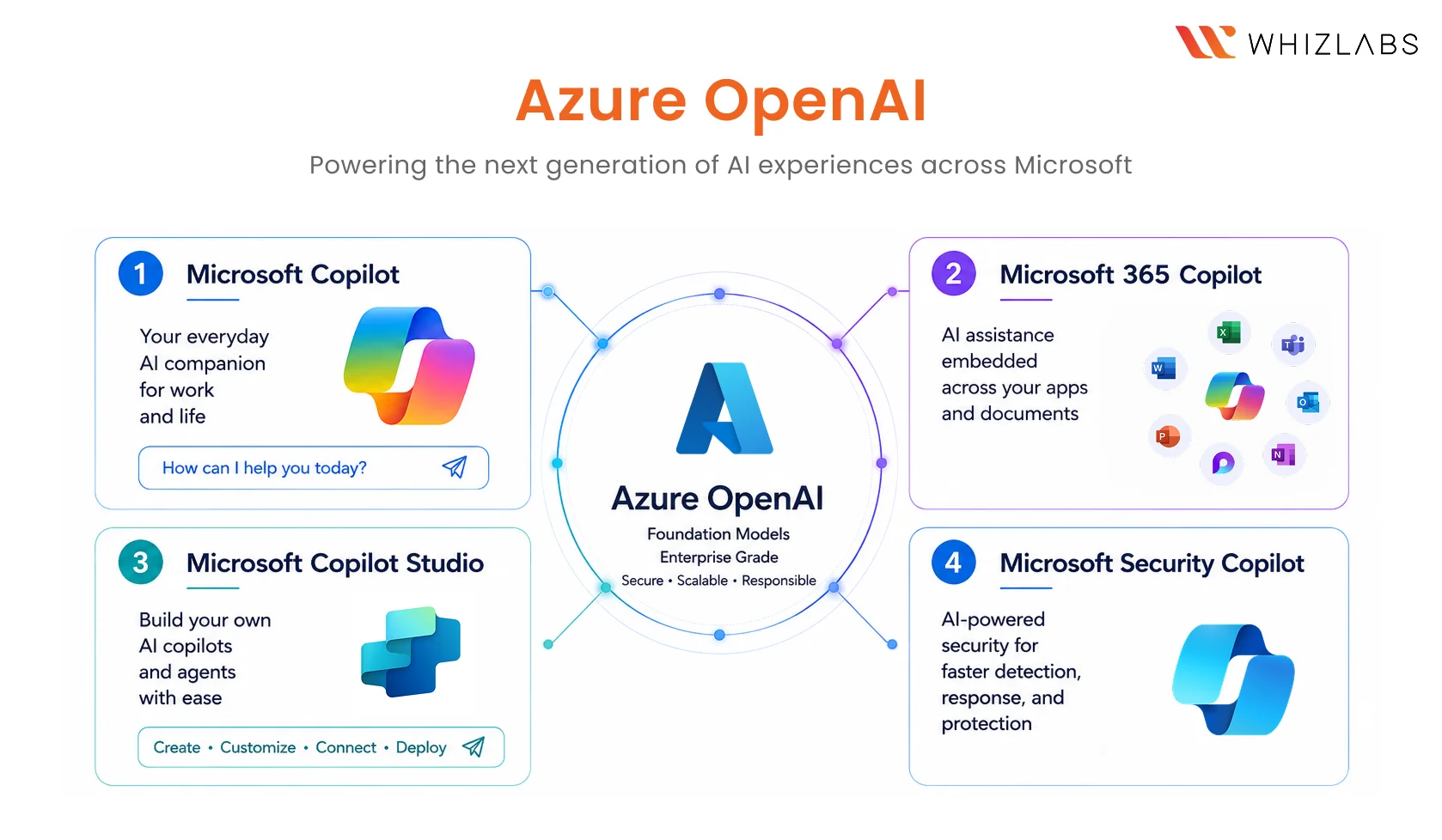
If you have found the Microsoft Copilot naming confusing, you are not alone. Microsoft uses “Copilot” as both a product name and a product family, applied to at least four distinct products that serve different users, operate at different layers of the stack, and carry different operational responsibilities for the Azure engineer.
The confusion resolves when you understand that each Copilot product is not a version of the same thing. They are different products that share a name because they share a foundation: Azure OpenAI Service underneath all of them.
Here is what each one actually is.
-
Microsoft Copilot
The general-purpose AI assistant is accessible across Microsoft products and the broader web. Powered by Azure OpenAI. Available to any user with a Microsoft account through Bing, Windows, Edge, and the Microsoft 365 web experience. It is the consumer-facing layer of Microsoft’s AI stack.
For the Azure engineer, the primary responsibility here is governance, understanding what organisational data Microsoft Copilot can access when used within a corporate Microsoft account, and ensuring that access is appropriately scoped and audited.
-
Microsoft 365 Copilot
AI is embedded directly inside Microsoft 365 applications such as Teams, Word, Excel, Outlook, PowerPoint, and more. Unlike the general Microsoft Copilot, M365 Copilot has access to your organisational data through Microsoft Graph: your emails, calendar entries, meeting transcripts, documents, and Teams conversations.
This is the product most enterprise organisations are actively rolling out and the one with the most significant engineering governance surface. The engineer’s responsibilities include licensing and assignment, configuring what Microsoft Graph can access, applying sensitivity labels to organisational data, monitoring what M365 Copilot surfaces to which users, and ensuring the permission architecture is clean before the rollout goes live.
A poorly governed Microsoft 365 Copilot deployment is one where users can ask questions and receive answers drawn from documents they would never have found, or been permitted to access on their own. The AI does not enforce permissions you have not defined. That is the engineer’s job.
-
Microsoft Copilot Studio
The platform for building custom AI agents, such as copilots with specific knowledge, defined behaviours, and integration with your organisation’s systems. Built on Azure OpenAI Service and Power Platform. No code is required to build an agent; significant operational governance is required to run one responsibly.
When an organisation needs an AI assistant that knows its specific product catalogue, its internal HR policies, or its customer service workflows, the Copilot Studio is where that gets built. The engineer’s role is not in the build. It is in the governance layer: approving agents before they go live, configuring what data sources agents can access, monitoring agent activity and escalation patterns, and maintaining security controls around what the agent can do on behalf of a user.
-
Microsoft Security Copilot
AI is embedded in Microsoft’s security operations tooling, like Defender, Sentinel, Intune, and Entra. It analyses security signals, surfaces threat patterns, and helps security analysts investigate incidents, triage alerts, and generate reports faster than manual analysis allows.
For the Azure engineer supporting security operations, the responsibilities are integration-focused: connecting Security Copilot to existing Defender and Sentinel workspaces, configuring appropriate access for security analyst roles, ensuring audit logging is in place, and understanding how Security Copilot’s outputs feed into existing incident response workflows.
Microsoft Copilot vs Copilot Studio vs M365 Copilot
| Product | What It Does | Who Uses It | Engineer Manages |
| Microsoft Copilot | General-purpose AI assistant across Microsoft products and the web | All users | Data access governance, organisational boundary controls |
| Microsoft 365 Copilot | AI embedded in Teams, Word, Excel, Outlook, and PowerPoint via Microsoft Graph | Knowledge workers | Licensing, permissions, Graph access, sensitivity labels, monitoring |
| Microsoft Copilot Studio | Platform for building custom AI agents and copilots | Developers, IT teams, business analysts | Agent approval, data source governance, security controls, and monitoring |
| Microsoft Security Copilot | AI for security operations — threat analysis, alert triage, incident response | Security analysts, SOC teams | Defender/Sentinel integration, analyst access controls, audit logging |
Microsoft has four products called Copilot. They are not versions of the same thing. They are different products that share a name because they share a foundation.
All four products share one foundation: Azure OpenAI Service. The models, the safety filters, the API layer, and the same infrastructure underlie every Copilot product in the Microsoft ecosystem. Which is why governing that foundation well is not optional. It is the prerequisite for governing everything above it.
Azure AI Foundry: The Control Plane for Enterprise AI
Azure AI Foundry is Microsoft’s unified platform for managing AI models and AI-powered applications in enterprise environments.
If Azure OpenAI Service is the API that exposes individual models, Azure AI Foundry is the platform where you manage everything above that, model selection from a catalogue spanning Microsoft, OpenAI, Meta, Mistral, and others; RAG pipeline configuration; fine-tuning workflows; compute provisioning; application evaluation before deployment; and ongoing monitoring after it.
For most AI content, Azure AI Foundry is described from a developer’s perspective as a build platform for creating AI applications. For the Azure engineer, the more useful framing is different. Azure AI Foundry is an operational control surface. It is closer to the Azure Portal experience you already know than to any developer toolchain. It is where the engineering work of managing enterprise AI happens, not the model training, not the application development, but the governance and operational layer that sits between the raw model capability and the products your organisation’s users interact with.
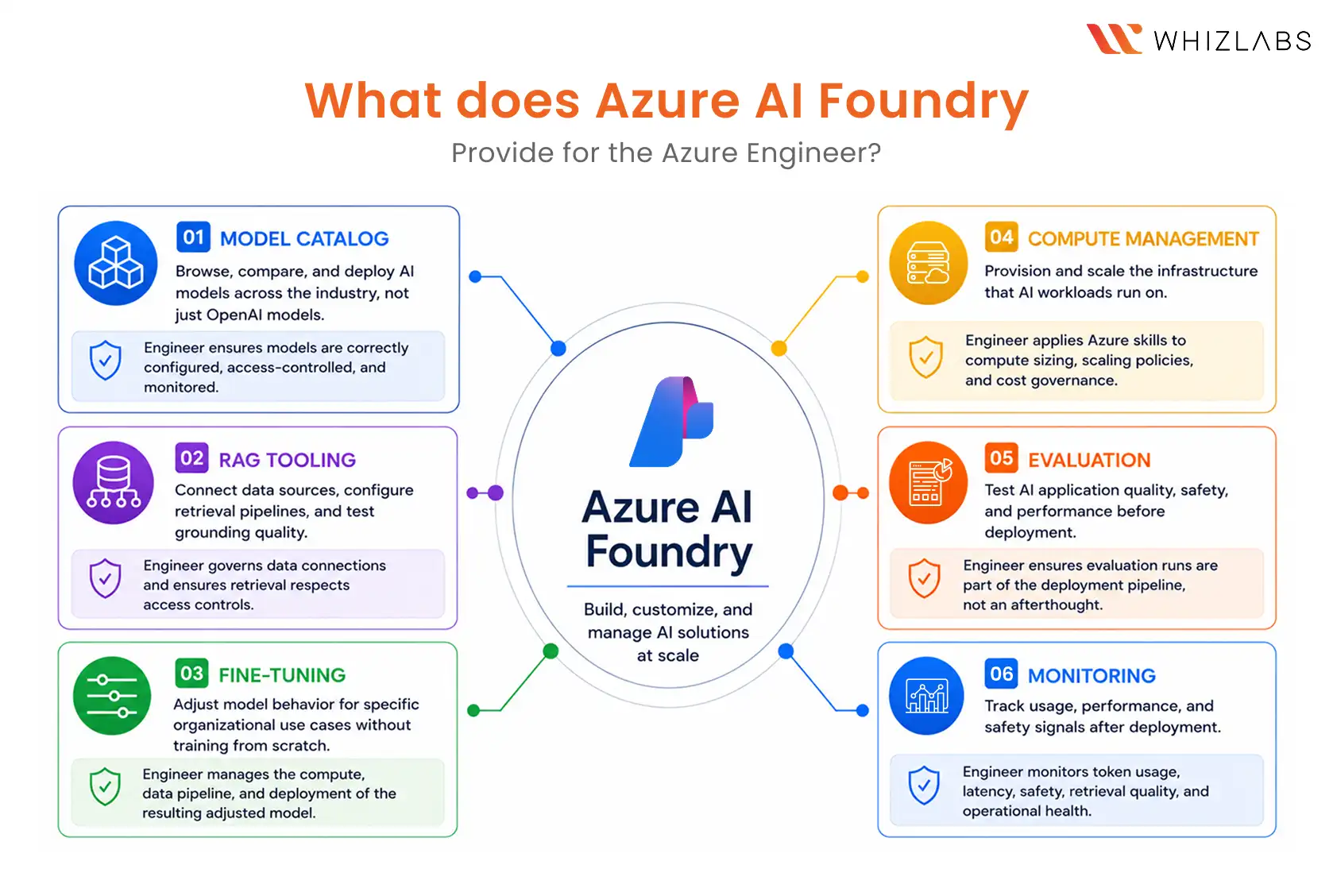
What does Azure AI Foundry provide for the Azure engineer? 
-
Model catalog
Browse, compare, and deploy AI models across the industry, not just OpenAI models. When your organisation evaluates whether a different model is better suited to a specific use case, Azure AI Foundry is where that evaluation happens. The engineer’s role is to ensure deployed models are correctly configured, access-controlled, and monitored.
-
RAG tooling
Connect data sources, configure retrieval pipelines, and test grounding quality, managed through a unified interface. The engineer governs the data connections and ensures retrieval respects access controls.
-
Fine-tuning
Adjust model behaviour for specific organisational use cases without training a model from scratch. Fine-tuning is a controlled process; the engineer manages the computer, the data pipeline, and the deployment of the resulting adjusted model.
-
Compute management
Provision and scale the infrastructure that AI workloads run on. This is where Azure engineering skills transfer most directly, such as compute sizing, scaling policies, and cost governance. The same discipline applied to Azure Kubernetes Service or Azure VMs applies to AI workload infrastructure.
-
Evaluation
Test AI application quality, safety, and performance before deployment. Evaluation in Azure AI Foundry is not traditional software testing; it assesses whether AI outputs meet quality thresholds, safety requirements, and accuracy standards. The engineer ensures evaluation runs are part of the deployment pipeline, not an afterthought.
-
Monitoring
Track usage, performance, and safety signals after deployment. Token consumption, response latency, safety filter triggers, retrieval quality, and the operational metrics of AI systems that belong in the engineer’s monitoring dashboards alongside the infrastructure metrics they already track.
Azure AI Foundry is where the Azure engineer moves from supporting AI to managing it.
What does this mean for Your Role as an Azure Engineer?
Generative AI is not replacing Azure engineers.
That is the honest answer. And it is worth saying directly before anything else, because the question sits underneath every conversation about AI in engineering teams, asked or not.
What generative AI is doing is expanding what Azure engineers are expected to understand. The infrastructure layer: virtual machines, networking, identity, storage, monitoring, cost governance, is not disappearing. It is being joined by a new layer: AI services that run on top of that infrastructure and require the same operational discipline the engineer already applies to everything else.
The discipline is familiar. The services are new. That is the actual shape of the change.
What is changing?
Supporting AI-powered applications is now a standard ticket type. Two years ago, an Azure engineer supporting a Copilot deployment was working on a specialist project. Today, it is operational business-as-usual in organisations that have moved past the pilot stage, which is most of the enterprise market.
Copilot rollouts require engineering governance that most deployments have underestimated. The same rigour applies to any enterprise SaaS rollout for identity configuration, data access scoping, monitoring, and change control. It applies to Copilot with additional AI-specific considerations like what Microsoft Graph can access, how sensitivity labels protect content, and what the audit trail looks like when an AI surfaces a document that a user would not have found themselves.
Architectural conversations now include AI service selection. Engineers are being pulled into decisions about whether a use case needs RAG or fine-tuning, whether Azure OpenAI or an alternative model is more appropriate, and whether an agent should be built in Copilot Studio or a custom application. These are not purely technical decisions; they are governance and operational decisions dressed in technical language.
AI awareness is becoming an expected competency, not a differentiating one. Job descriptions that listed “AI skills” as a bonus two years ago are listing them as requirements today. The window in which this knowledge is a differentiator is narrowing.
What’s not changing is that the Core infrastructure skills remain foundational and more critical in AI environments, not less. Identity and access management, network security, monitoring, and cost governance: these disciplines do not become less important when AI is added to the stack. They become more important because the consequences of misconfiguration are larger when the system can autonomously surface organisational data.
The engineer’s role as the person who keeps systems reliable, secure, and governed is unchanged. What changes is the surface area of that responsibility.
The engineers who will be most valuable in the next three years are not the ones who learned AI instead of Azure. They are the ones who understand AI well enough to govern it on top of the Azure infrastructure they already know.
How to Get Started with Generative AI for Azure Engineers?
If Azure AI Engineer is where the role is heading, here is a Realistic Learning Path for you to get started with Generative AI for Azure Engineer. This is a sequenced approach that builds on what you already know, one layer at a time. No machine learning background required at any step.
Step 1: Build the conceptual foundation
Understand what generative AI is, how it differs from the automation you already work with, and how the Azure AI services connect. This article is Step 1. If you read this far, you have already completed it. The concepts in here: the three-layer model, the Microsoft AI stack, the governance through-line, are the mental framework everything else builds on.
Step 2: Go deeper into the Azure AI services
Move from awareness to working knowledge on Azure OpenAI Service, Azure AI Foundry, and Microsoft Copilot. Understand how each integrates with Azure identity, networking, and monitoring. Focus on the engineer’s operational role, not the developer’s build role. The question to answer at this step: what does the engineer configure, monitor, and govern in each service?
Step 3: Understand AI governance and security
Learn how to govern AI services the way you govern any Azure resource: access controls, data protection, monitoring, and responsible AI principles. This is where your existing Azure skills transfer most directly. You are not learning new disciplines. You are applying familiar ones to a new surface.
Step 4: Get hands-on with the services
Open Azure OpenAI in the Azure Portal. Navigate Azure AI Foundry. Review the Copilot admin centre. The goal is not to build something; it is to understand what the engineer’s operational surface looks like before you manage it in production. Familiarity before pressure is always the better sequence.
If you want a structured path through all four steps in a single course, our Generative AI for Azure Cloud Engineers course covers each one, without requiring a machine learning background. It is built for engineers who already know Azure and want to understand the AI layer running on top of it.
FAQ
1. What is generative AI for cloud engineers?
Generative AI is a class of AI systems that produce new content: text, code, images, or data in response to input. Unlike traditional software that executes defined rules, generative AI generates responses based on patterns learned from training data. For Azure engineers, it functions like any other managed API service: you configure access, monitor usage, manage cost, and govern what data enters and exits the system.
2. Do Azure engineers need to learn machine learning to work with generative AI?
No. The machine learning happens inside the model, which Microsoft manages. The Azure engineer’s responsibility is the service layer: configuring deployments, managing access controls, monitoring performance, and governing data. These are infrastructure and operations skills, not data science skills. Understanding how the technology works conceptually is necessary. Building or training models is not.
3. What is the difference between Microsoft Copilot and Copilot Studio?
Microsoft Copilot is a general-purpose AI assistant embedded across Microsoft products, available to any user with a Microsoft account. Copilot Studio is a platform for building custom AI agents tailored to your organisation’s specific workflows and knowledge. Copilot is for end users. Copilot Studio is for organisations that want to customise and extend AI behaviour beyond what out-of-the-box Copilot provides.
4. Which Azure services does a cloud engineer need to understand for generative AI?
The core services are Azure OpenAI Service (the AI model API), Azure AI Foundry (the management platform), Azure AI Search (for RAG and retrieval), Microsoft Copilot Studio (for custom agent development), and Microsoft 365 Copilot (for workplace AI governance). Supporting services include Azure Monitor (for AI performance and usage tracking), Microsoft Entra ID (for AI service access control), and Microsoft Purview (for data governance in AI environments).
5. Are there any courses on Generative AI for Azure Cloud Engineers?
Yes. Whizlabs has a dedicated course on Generative AI for Azure Cloud engineers.
The Layer You Were Always Going to Need
Azure OpenAI. Copilot. RAG. SharePoint data connections. The conversation moved fast, and the terms were familiar enough to follow, but not precise enough to lead.
You can lead that conversation now.
Not because you became a data scientist. Not because you left cloud engineering behind and pivoted into AI. Because you understand the layer that sits on top of the infrastructure, you already know the governance, access, monitoring, and operational discipline that layer requires from you.
That is what this guide was for. And that is what the engineers who are getting ahead right now figured out earlier than most: generative AI did not arrive to replace Azure engineers. It arrived to run on top of the infrastructure that Azure engineers already manage.
The Generative AI for Azure Cloud Engineers course at Whizlabs is built for exactly this, no machine learning background required, designed for engineers who already know Azure and are ready for the next layer.
Understanding it is not a career pivot.
It is the next layer of the job. And you are already most of the way there, because the discipline you have built managing Azure infrastructure is exactly the discipline AI services require.
The foundation is already yours. This is what you build on top of it.

- What Is Generative AI for Azure Cloud Engineers? - July 13, 2026
- From Cloud Certification Ready To Building Real Capabilities - July 2, 2026
- How to Pass AWS SOA-C03 CloudOps Engineer Associate Exam? - June 12, 2026
- Claude Certified Architect – Foundations CCA-F Exam Guide - June 4, 2026
- DP-700 Master Content Guide Microsoft Fabric Explained for Data Engineers - May 28, 2026
- DP-700 Microsoft Fabric Data Engineer Career Roadmap - May 19, 2026
- AWS AI Practitioner vs Other AI Certs: Which to Choose in 2026 - May 6, 2026
- Why Executives Choose the Microsoft AB-731 AI Certification - April 24, 2026