If the AWS Certified Security Specialty (SCS-C03) is on your list this year, you probably already work with AWS. The exam is built on that assumption. It is a specialty-level cert, and it tests depth in security across six domains:
- Threat detection and incident response
- Logging and monitoring
- Infrastructure security
- Identity and access management
- Data protection
- Governance
Sit with a few practice questions and you will notice that working on AWS security projects is inevitable to pass SCS-C03. Because in the exam, they rarely ask what a service does. They hand you a situation instead. An application is storing unencrypted data. An account is showing unusual API activity. Then they ask what you would do.
And when you read the four options, all of them look right. KMS does encrypt buckets. Bucket policies do block public access. Macie does find sensitive data. There are no false options to cross out. The only way to pick correctly is to recognise the situation, and you recognise situations you have handled before.
That is the case for hands-on practice, and it is the thinking behind this blog.
10 AWS Security Projects to Practice in Whizlabs
Instead of study tips, it gives you ten AWS security projects to build. Each one is a small, real piece of security work a cloud engineer would do: encrypting storage, setting up threat detection, writing WAF rules, automating a response. Together they cover all six exam domains, and each project is tagged with its domain so you can track your coverage as you go.
Data protection: Macie and KMS
Project 1: Discover sensitive data in S3 with Amazon Macie
Exam domain: Data Protection
Companies collect a lot of data in S3 over the years. Customer exports, backups, files people uploaded and forgot. Some of it contains names, card numbers or addresses, and usually nobody knows which files. You cannot protect data you have not found.
Macie handles this. It scans S3 buckets using pattern matching and machine learning, and reports what sensitive data it found and where. It also flags risky bucket settings like public access and missing encryption.
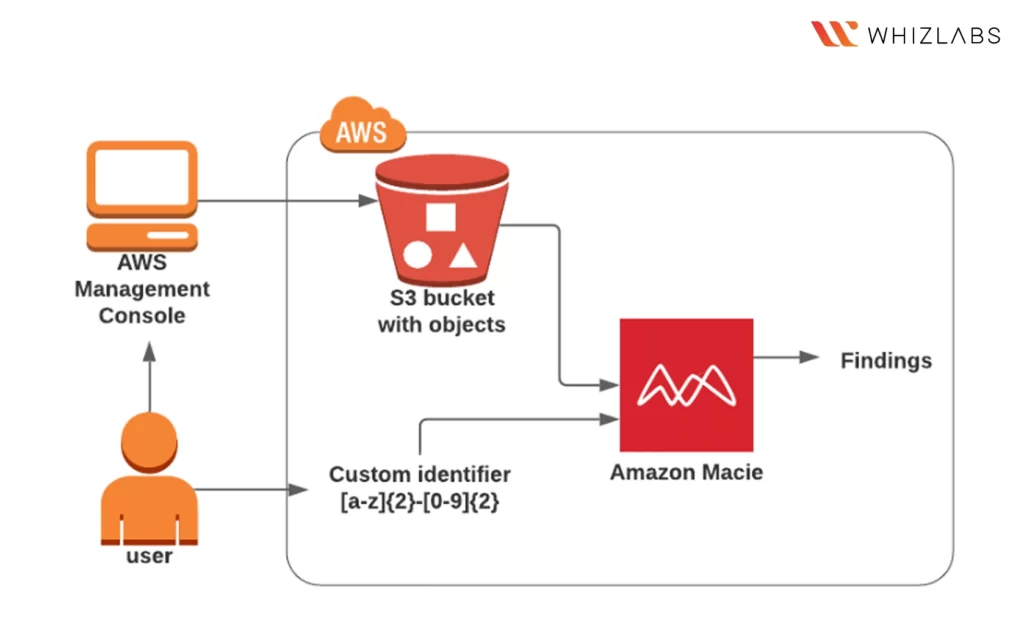
What you’ll do in this lab:
- Enable Macie for the account
- Build a custom identifier for data patterns specific to your organisation
- Create and run a Macie scan job on an S3 bucket
- Read the findings
In the exam: Macie is the answer when a question involves finding sensitive data at scale. Running one real job makes those questions easy to spot.
Build it: Discover sensitive data present in S3 bucket using Amazon Macie (1 hour)
Project 2: Encrypt S3, EBS and AMIs with AWS KMS
Exam domain: Data Protection
AWS Key Management Service (KMS) appears more than any other service on the AWS Security Specialty exam. Every AWS service that stores data uses it for encryption, so a good grasp of KMS covers a large part of the Data Protection domain.
The idea itself is simple. KMS keeps your encryption keys in one place, controls who can use them through key policies, and connects to S3, EBS, RDS and most other storage services. This project covers that whole surface in one sitting.
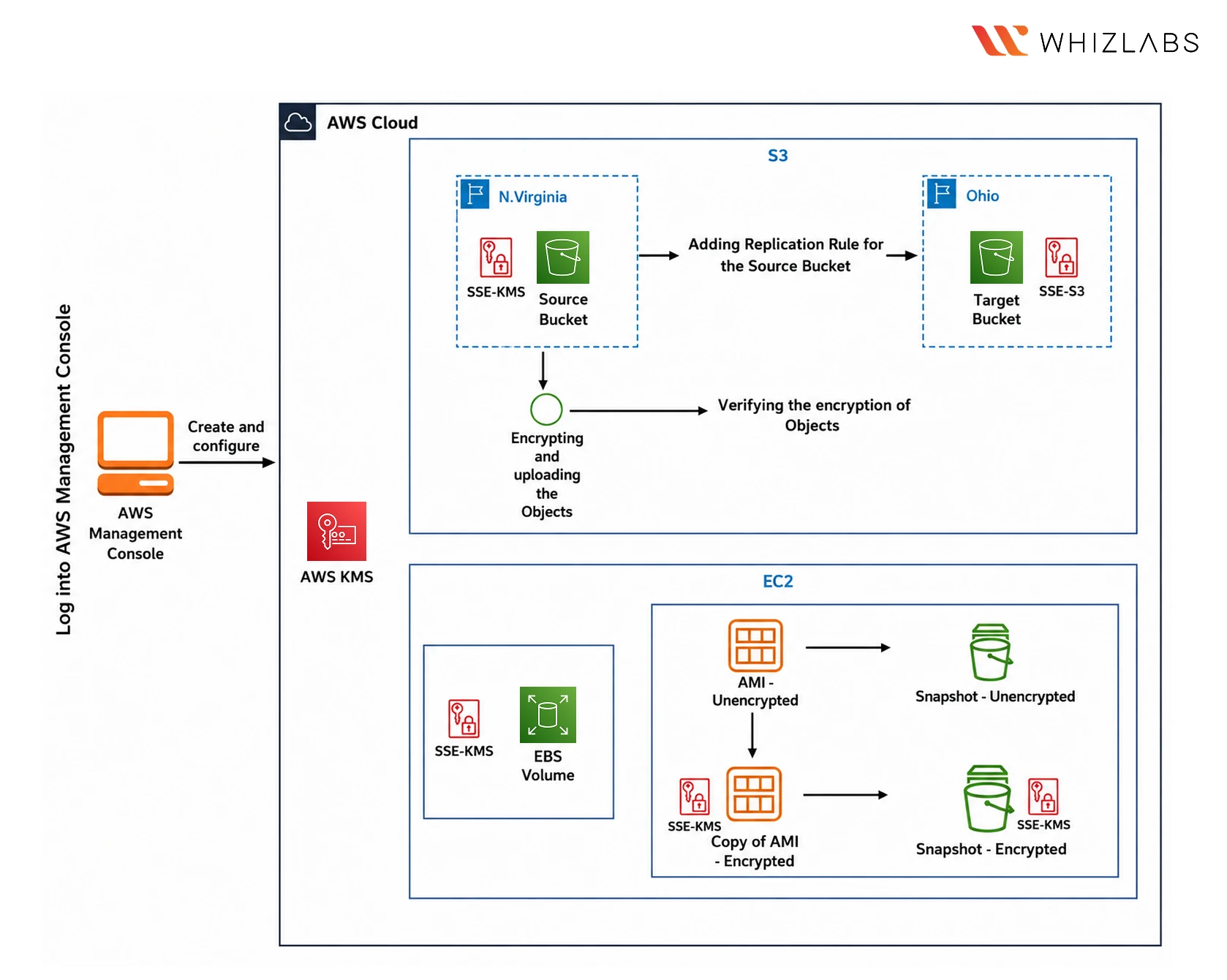
What you’ll do in this hands-on lab:
- Create a KMS key and enable automatic rotation
- Encrypt an S3 bucket and verify objects are encrypted on upload
- Set up cross-region replication for the encrypted bucket
- Encrypt an EBS volume, then an AMI and its snapshots
In the exam
Key rotation, key policies, envelope encryption and encrypted replication all get tested, and this project touches each of them. It is mandatory that you build this.
Build it: Encrypt S3 bucket, EBS Volume and AMI using AWS KMS (1.5 hours)
Threat detection: GuardDuty, Inspector2 and CloudTrail
Project 3: Detect threats across your account with GuardDuty
Exam domain: Threat Detection and Incident Response
GuardDuty is AWS’s threat detection service. It reads your CloudTrail logs, VPC Flow Logs and DNS logs, and uses threat intelligence and anomaly detection to flag things like unauthorised access attempts, suspicious network activity and account takeovers.
The useful skill here is reading its findings. A finding tells you what happened, which resource was affected and how serious it is, and knowing your way around that format matters more than knowing the feature list.
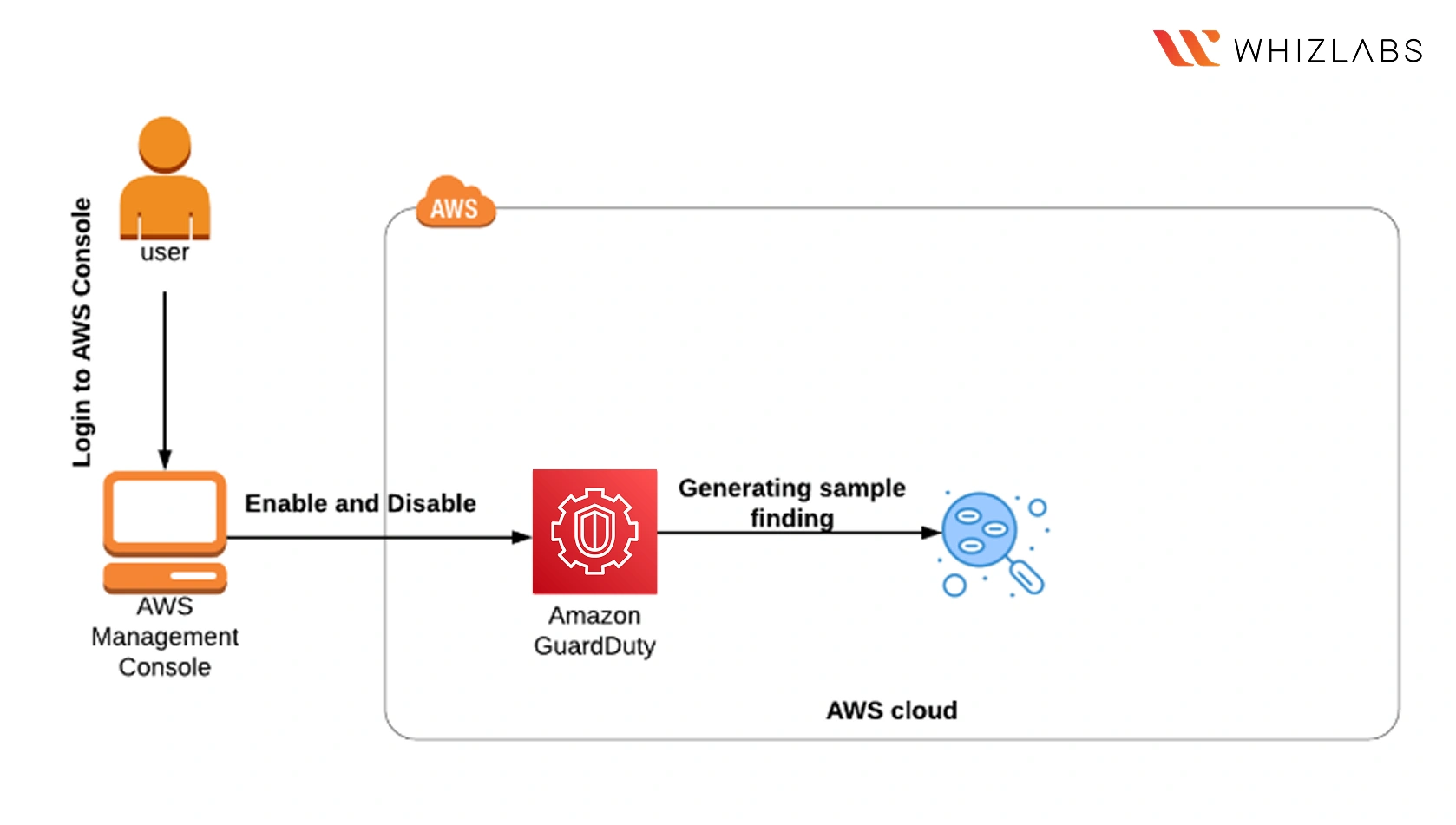
What you’ll do in this hands-on lab:
- Enable GuardDuty on the account
- Explore the console and see where findings live
- Generate sample findings and go through what each one means
In the exam: GuardDuty is the default answer for continuous threat detection. Reading real findings for thirty minutes is the fastest way to learn what it does.
Build it: Introduction to Amazon GuardDuty (30 minutes)
Project 4: Run continuous vulnerability scans with Inspector2
Exam domain: Threat Detection and Incident Response
GuardDuty looks for threats coming in. Inspector2 looks at your own code and infrastructure. A Lambda function or an EC2 instance can carry a library with a known vulnerability, and that has nothing to do with network security.
Inspector2 scans your EC2 instances, container images and Lambda functions against known vulnerability databases. It returns findings with CVE identifiers and severity ratings, so you know what needs fixing first.
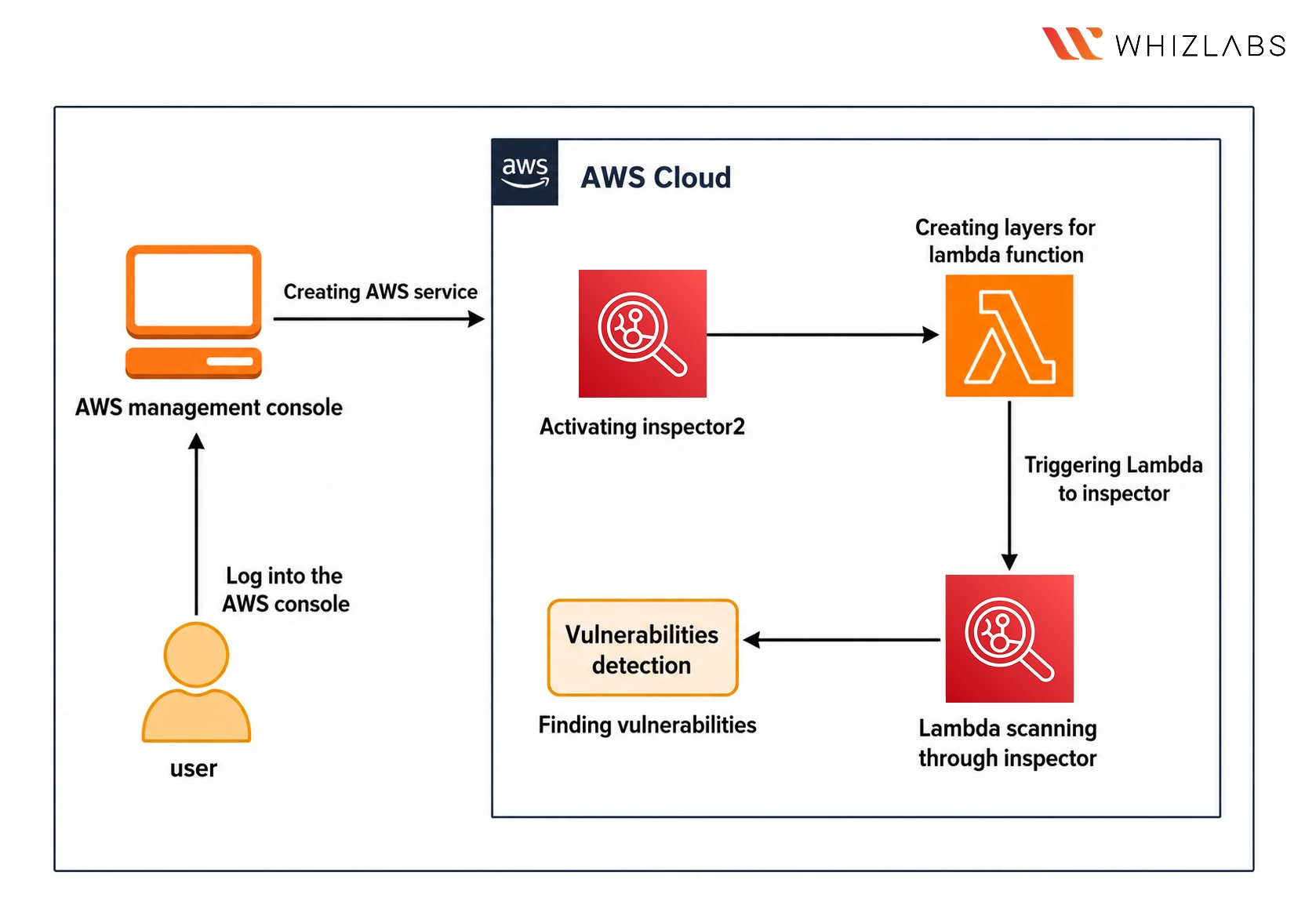
What you’ll do in this hands-on lab:
- Activate Inspector2 on the account
- Create a Lambda function with layers
- Trigger the function and let Inspector scan it
- Review the vulnerability findings and severity ratings
In the exam
Questions about continuous vulnerability assessment across EC2, ECR or Lambda point to Inspector.
Build it: Find vulnerabilities on Inspector2 using Lambda scanning (1 hour)
Project 5: Build an audit trail with CloudTrail and CloudWatch alerts
Exam domain: Security Logging and Monitoring
Every action in an AWS account is an API call, and CloudTrail records all of them. Who did what, from where, at what time. That record is what you rely on for security analysis, audits and investigations.
Logs on their own only help if someone reads them, so the second part of this project adds alerting. You create metric filters on the logs and connect them to a CloudWatch alarm, so a specific action in the account sends you an alert instead of sitting unread in a bucket.
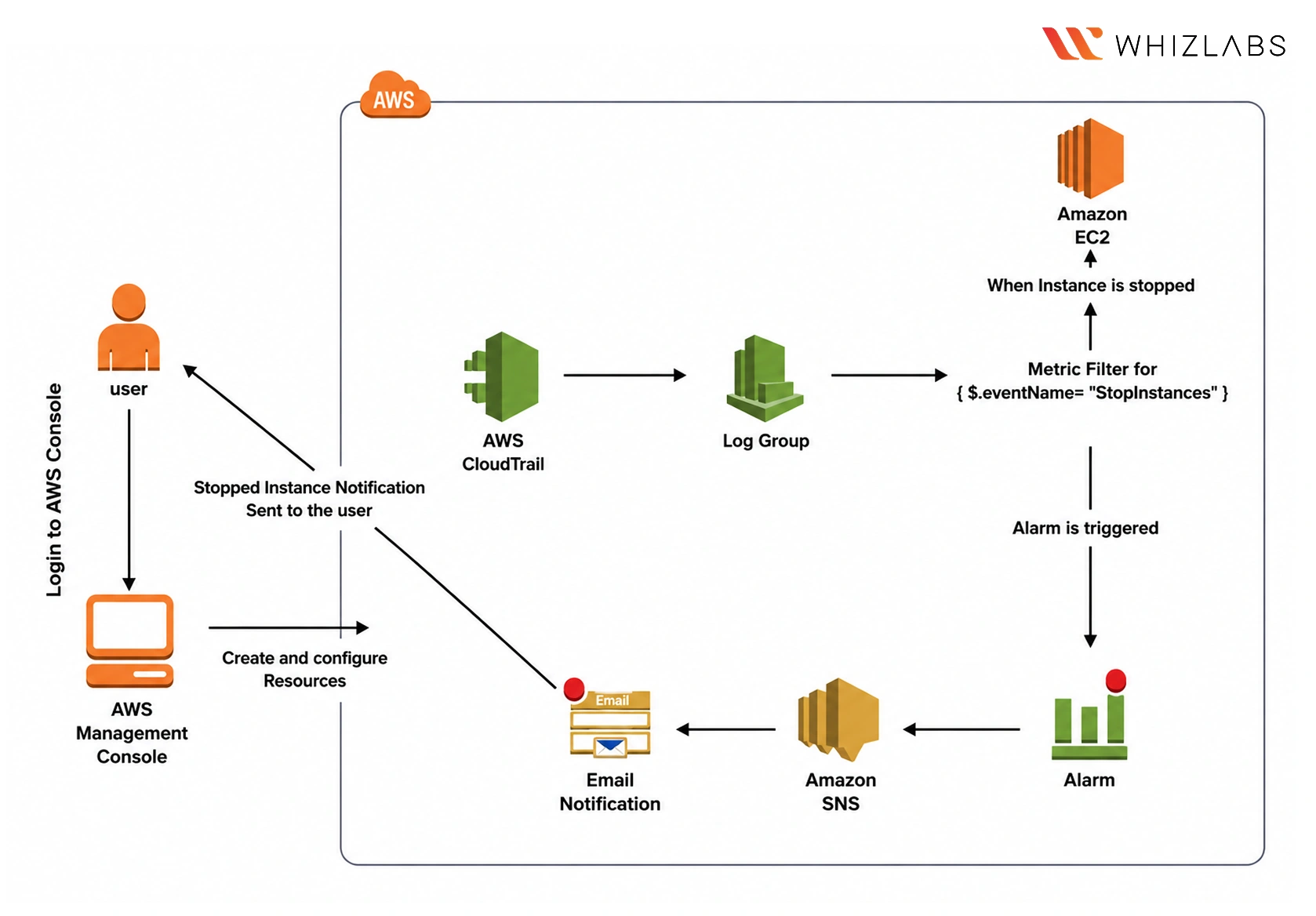
What you’ll do in this hands-on lab:
- Configure CloudTrail to capture EC2 events and deliver them to an S3 bucket
- Open the raw log files and see what an API call looks like on record
- Create metric filters on the CloudWatch log group
- Set up an alarm that triggers on a specific action
In the exam
Detecting unauthorised access through log analysis comes up repeatedly, and this build is that exact scenario.
Build it: Configuring CloudTrail Logs for EC2 Events (45 minutes) and AWS Access control alerts with CloudWatch and CloudTrail (1 hour)
Incident response: Lambda
Project 6: Automate incident response with Lambda
Exam domain: Threat Detection and Incident Response
When something flags a compromised EC2 instance, the response time matters. If the finding waits in a queue for someone to read it, the instance stays compromised for hours. Automating the first response fixes that.
In this project you write a Lambda function that stops and terminates EC2 instances, then trigger it with a test event. This is the basic pattern behind auto-remediation. In production, the trigger would be a GuardDuty finding or a CloudWatch alarm instead of a test event, and the function would isolate the instance in seconds.
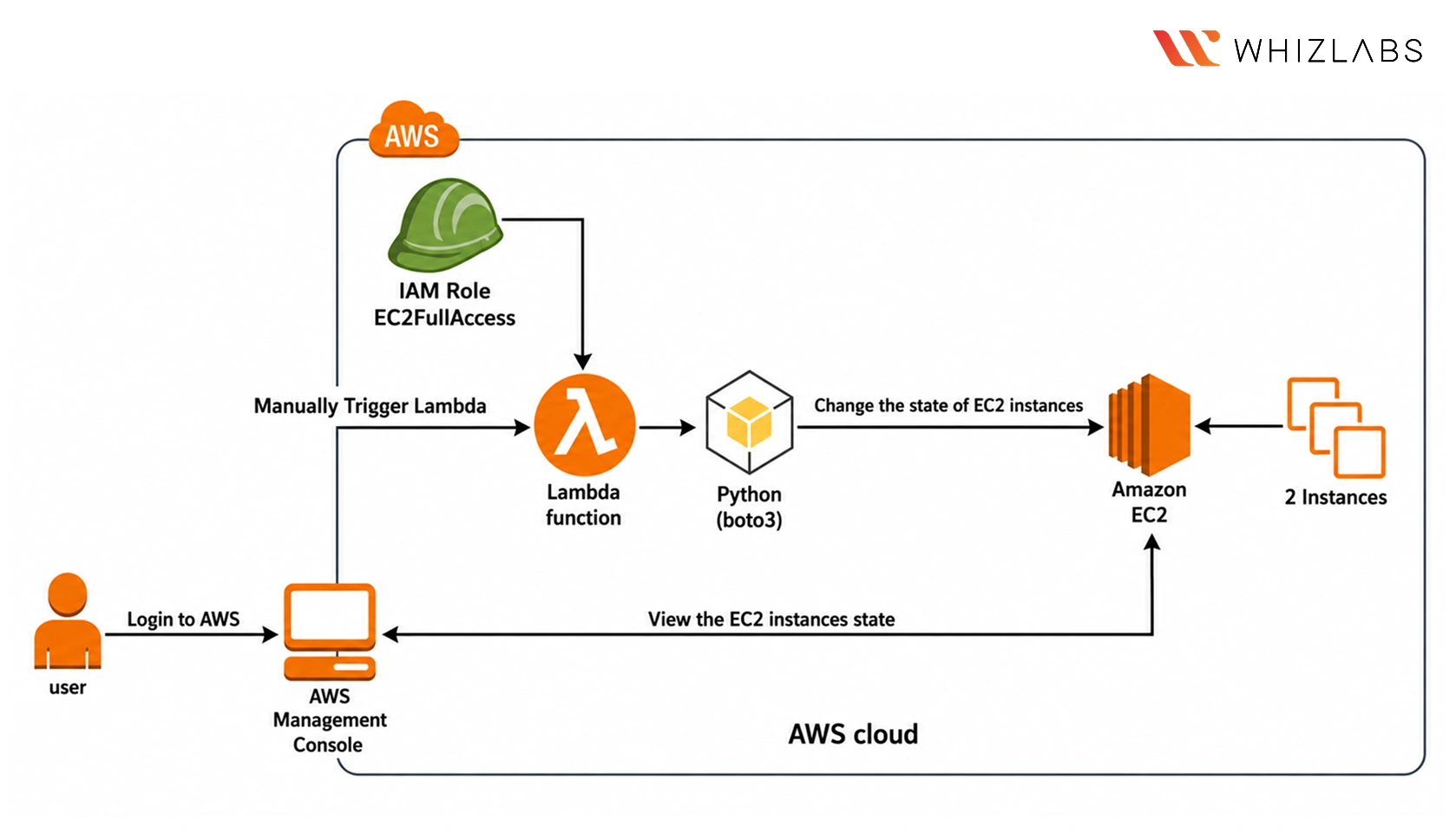
What you’ll do in this hands-on lab:
- Launch two EC2 instances
- Write a Lambda function that stops and terminates instances
- Fire a test event and confirm both instances go down
- Verify the state change in the console
In the exam
Containment and auto-remediation questions in Domain 1 describe this pattern. Most candidates practise detection and skip response.
Build it: Lambda Function to Shut Down and Terminate an EC2 Instance (30 minutes)
Application security: WAF and Secrets Manager
Project 7: Block real attacks with AWS WAF
Exam domain: Infrastructure Security
A public application receives requests from the whole internet, including automated SQL injection attempts that start within hours of going live. AWS WAF filters those out. You write rules describing what a bad request looks like, attach them to a load balancer or CloudFront distribution, and matching requests never reach your servers.
This is the longest project on the list and the closest to production work. You build the full setup, then send bad requests at it yourself and watch them get blocked.
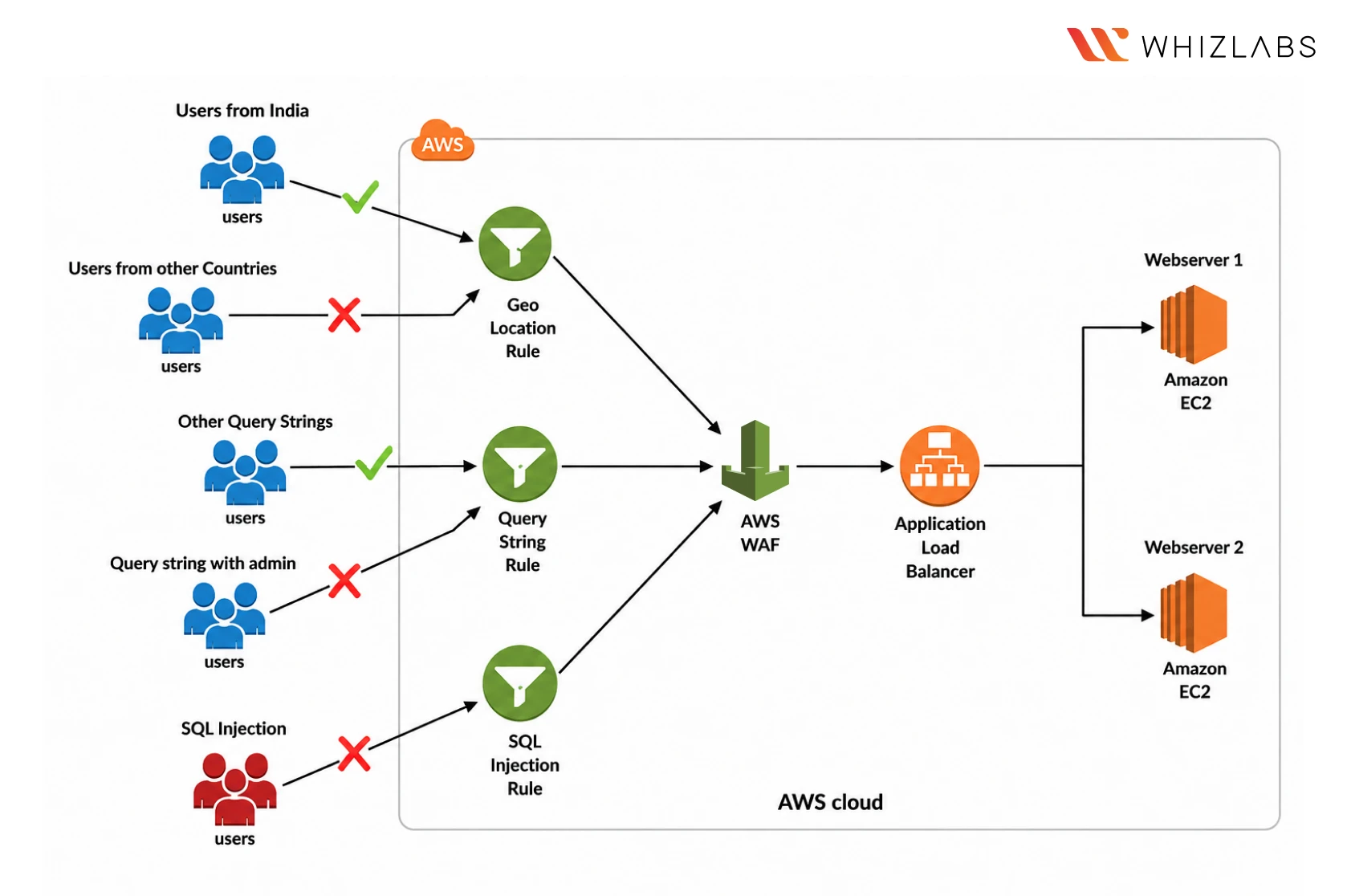
What you’ll do in this hands-on lab:
- Launch two EC2 instances behind an Application Load Balancer
- Create a WAF Web ACL with rules for SQL injection, geo blocking and query strings
- Attach the Web ACL to the load balancer
- Test the load balancer and confirm the blocked requests fail
In the exam
Edge protection questions are much easier to reason through once you have written the rules yourself.
Build it: Implementing AWS WAF with ALB to block SQL Injection, Geo Location and Query string (2 hours)
Project 8: Handle credentials securely with Secrets Manager
Exam domain: Identity and Access Management
Hardcoded credentials are one of the most common causes of cloud breaches. A key sits in plain text inside a function, the code gets shared or leaked, and whoever finds it has your access. Secrets Manager fixes this at the source. Credentials live encrypted in one managed place, applications fetch them at runtime, and rotation happens without code changes.
This lab has you build the insecure version first, then rebuild it properly. Seeing both versions side by side makes the difference clear.
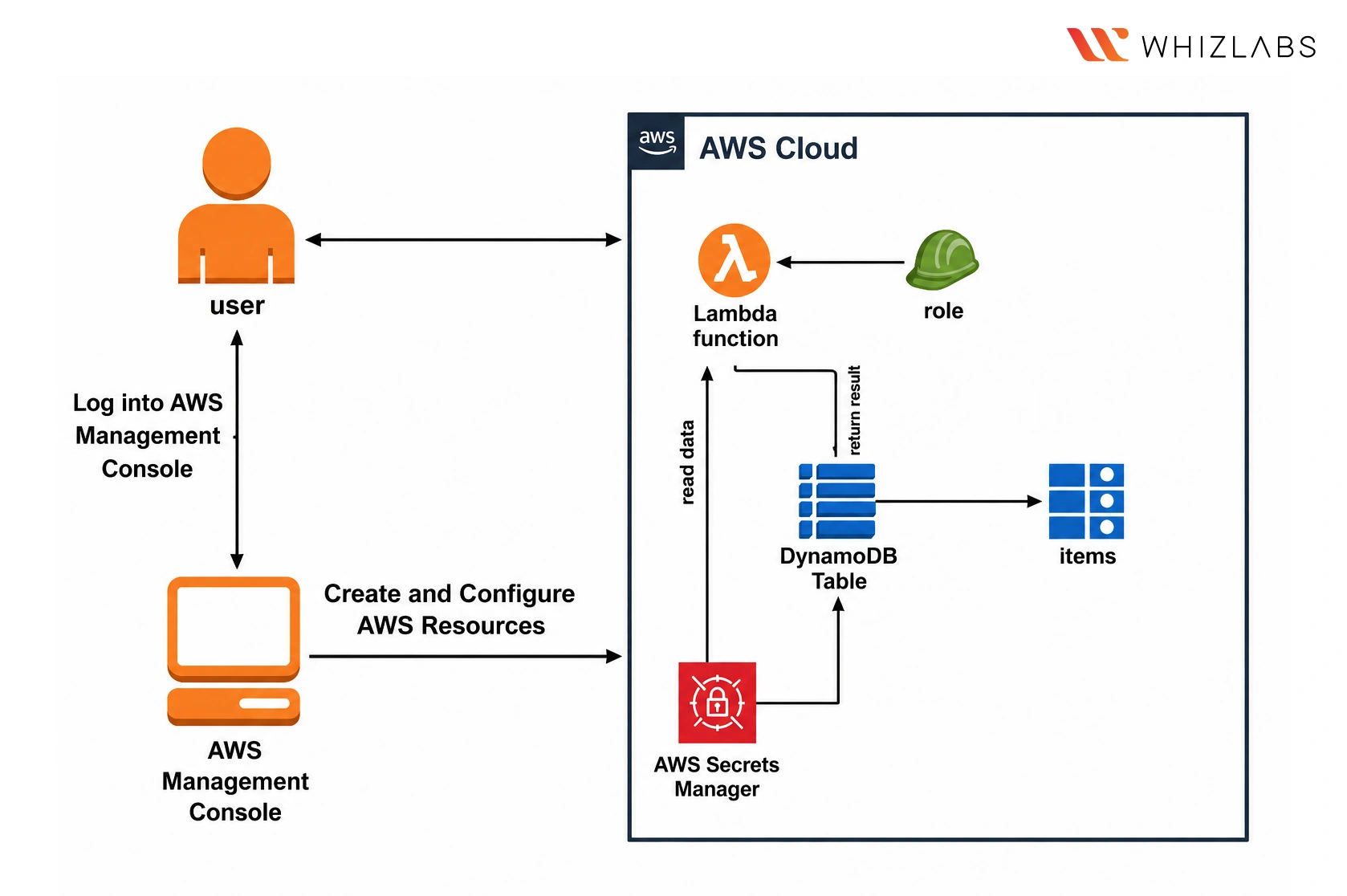
What you’ll do in this hands-on lab:
- Write a Lambda function with hardcoded access keys that creates a DynamoDB table
- Store the same credentials in Secrets Manager
- Rebuild the function to fetch credentials from Secrets Manager at runtime
- Confirm both versions work and compare them
In the exam
Hardcoded credentials keep appearing as the wrong answer. Building both versions shows you why.
Build it: How to retrieve secrets stored in AWS Secrets Manager with AWS Lambda (1.25 hours)
Network monitoring: VPC Flow Logs and Athena
Project 9: Investigate network traffic with VPC Flow Logs and Athena
Exam domain: Infrastructure Security
VPC Flow Logs record the traffic moving through your network: source, destination, port, and whether it was accepted or rejected. Without them, you have no record of what happened on the network. With them, you can answer questions like what traffic reached a subnet on a given day.
Athena makes the logs usable. It lets you query the log files in S3 with plain SQL, which is much more practical than reading them manually. This is a two-lab build: the first sets up the network and logging, the second sets up the querying.
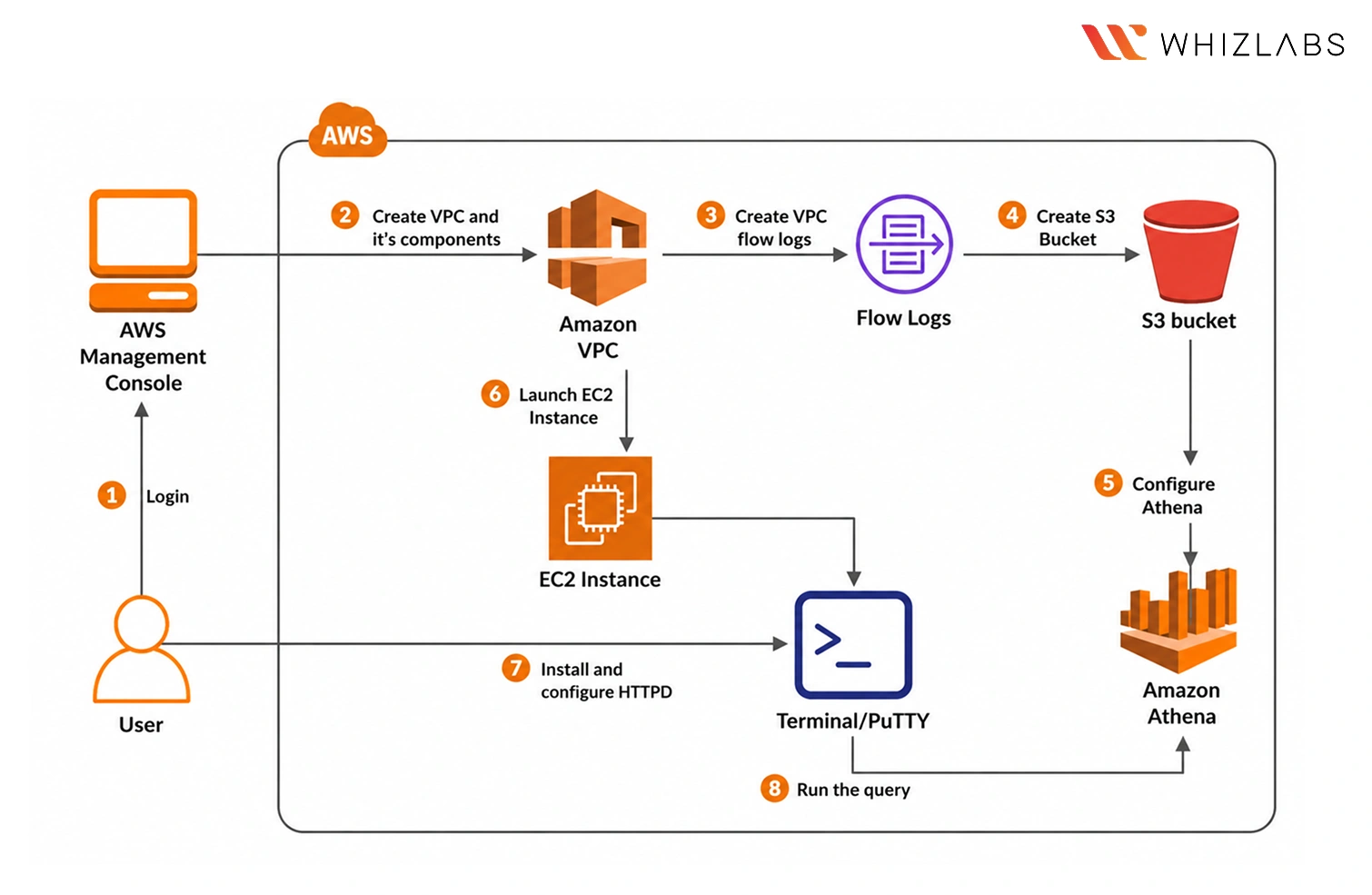
What you’ll do in this hands-on lab:
- Create a VPC with an internet gateway and subnet
- Enable Flow Logs and launch an EC2 instance to generate traffic
- Point Athena at the logs stored in S3
- Run SQL queries against the traffic data
In the exam
Network forensics questions describe traffic you need to trace, and this setup is how you trace it.
Build it: Creating AWS VPC Flow Logs and Generating Traffic (1 hour) and Query VPC Flow log using Amazon Athena (1 hour)
Compliance: AWS Config
Project 10: Enforce compliance automatically with AWS Config
Exam domain: Management and Security Governance
A compliance check that runs quarterly catches problems a quarter late. AWS Config checks continuously. It records the configuration of your resources, evaluates them against rules you define, and flags anything that drifts out of line as it happens. A security group that opens the wrong port gets reported immediately rather than at the next audit.
In this project, you set up Config, define a rule, then create one compliant and one non-compliant security group to watch the evaluation happen.
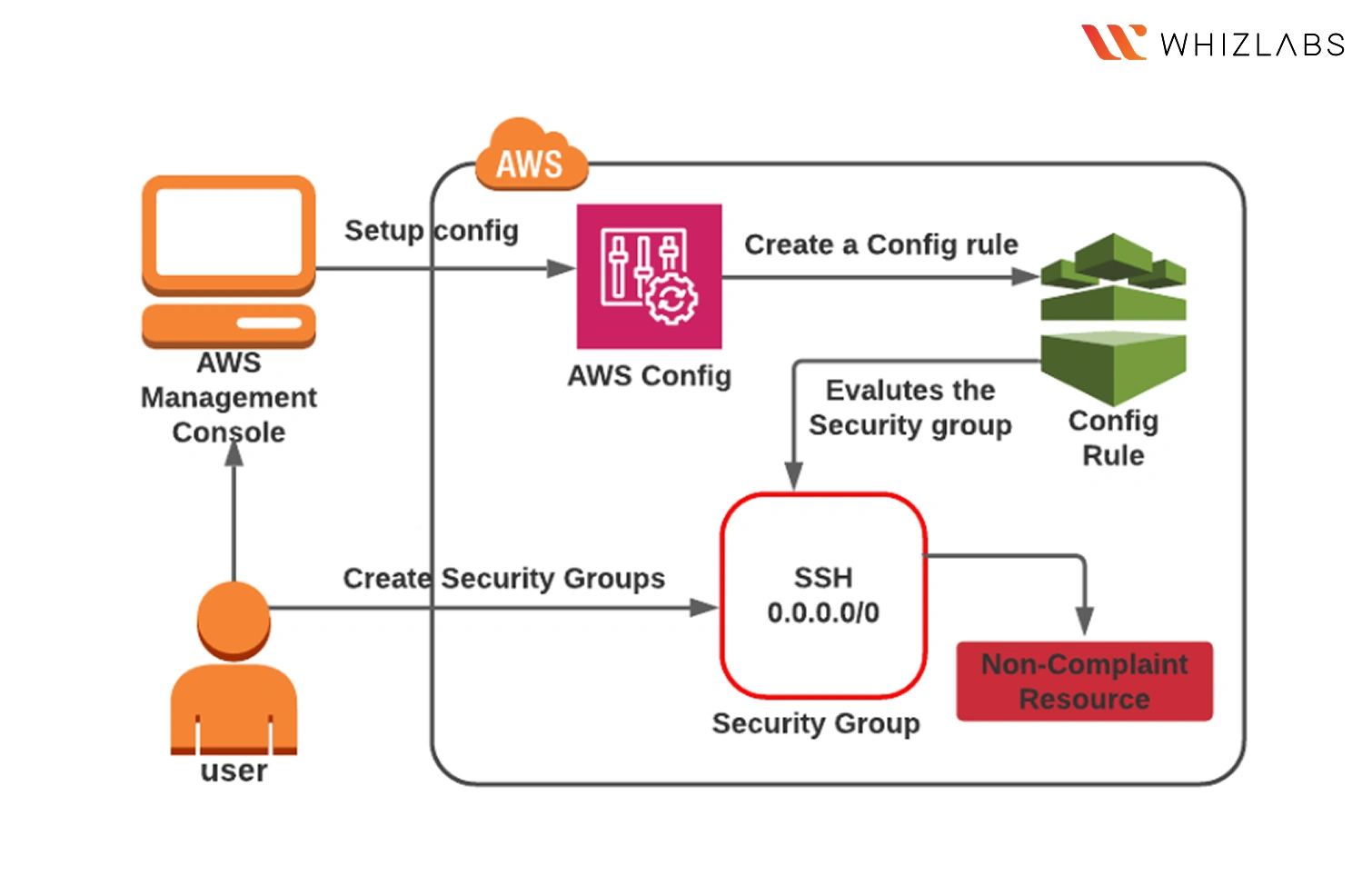
What you’ll do in this hands-on lab:
- Set up AWS Config with the one-click option
- Create a Config rule
- Build two security groups, one compliant and one not
- Check the compliance status Config reports for each
In the exam
Governance is the domain candidates prepare for least, so these questions are reliable marks if you have done this once.
Build it: Check the Compliance status of Security group using AWS Config (1 hour)
How to work through these
All ten projects together take around 12 hours of lab time. That fits into two weekends, or a couple of weeks of evenings if you do one project a day.
Every one of these SCS-C03 hands-on labs runs inside the Whizlabs environment. You get a live AWS console with permissions already scoped, and nothing is charged to your own account. If you want to experiment beyond the guided steps, the AWS Sandbox gives you an open environment for that.
If you are preparing for SCS-C03, the Whizlabs AWS Certified Security Specialty course pairs these labs with practice tests, so you can check how much of this is sticking before you book the exam.
References:
https://docs.aws.amazon.com/aws-certification/latest/security-specialty-03/security-specialty-03.html
Frequently Asked Questions
How do I prepare for the AWS Security Specialty (SCS-C03) exam?
Combine reading with hands-on practice. The exam is scenario based, so knowing what a service does is not enough, you need to have configured it and seen how it behaves. Work through the ten projects in this blog to cover all six exam domains, then use practice tests to find the gaps that are left.
How much hands-on practice do I need for SCS-C03?
The ten projects here take around 12 hours of lab time in total, and that covers every domain on the exam. Spread across two weekends or a couple of weeks of evenings, it is enough hands-on exposure for most candidates, especially alongside practice tests.
Which AWS services should I focus on for SCS-C03?
KMS is the most heavily tested service on the paper, so start there. After that, GuardDuty, CloudTrail, IAM, WAF, Macie, Inspector, Secrets Manager and AWS Config cover the bulk of scenario questions. Every one of these appears in the projects above.

- Databricks Certified Generative AI Engineer Associate Exam Guide (2026) - August 4, 2026
- 10 AWS Security Projects SCS-C03 Candidates Should Build - July 10, 2026
- Microsoft’s Latest AI Launches: Are We In the Agent Era? - June 26, 2026
- What Career Does MLA-C01 Lead To? Read This Before You Start - June 18, 2026
- What Is Agentic AI? And Why NCP-AAI Is the Cert for It - June 4, 2026
- Who Should Take AB-100 Certification? Beginner or Professional? - May 14, 2026
- How to Pass Cloud Certifications While Working Full-Time - April 28, 2026
- Is Power BI Worth Learning in 2026? PL-300 Guide - April 21, 2026