Are you ready to take your infrastructure automation skills to the next level? If so, then the HashiCorp Certified Terraform Associate exam is a great way to showcase your proficiency in Terraform. But how can you prepare for the exam?
The answer is quite simple. Yes, it is with HashiCorp Terraform Associate Hands-on Labs. By utilising hands-on labs, you can practice with real-world scenarios; you’ll gain the experience and confidence you need to ace the exam and take your career to new heights.
In this guide, we’ll explore some of the best resources for hands-on labs that will help you master Terraform and become a certified pro.
What is HashiCorp Certified Terraform Associate Certification?
The HashiCorp Certified Terraform Associate Certification is a professional certification that validates your knowledge and skills in using Terraform to manage infrastructure.
The roles and responsibilities of a HashiCorp Certified Terraform Associate include:
- Design and plan infrastructure as code (IaC) solutions using Terraform.
- Implement and configure infrastructure resources using Terraform.
- Understand Terraform best practices and apply them to infrastructure design and management.
- Collaborate with development and operations teams to define infrastructure requirements and ensure smooth deployment and management.
- Implement version control and manage state in Terraform.
- Use Terraform modules to create reusable infrastructure code.
- Write and execute Terraform scripts to automate infrastructure provisioning and configuration
- Troubleshoot issues related to Terraform scripts and infrastructure management
- Continuously evaluate and improve infrastructure design and management using Terraform
- Stay up to date with the latest features and updates in Terraform
Top 10 HashiCorp Terraform Associate Hands-on Labs
Taking hands-on labs is a crucial step in preparing for the HashiCorp Certified Terraform Associate Certification for several reasons.
Let’s explore some hands-on labs to prepare for the HashiCorp Certified Terraform Associate Certification.
1. Launching an EC2 Instance with the help of an AWS Lambda Function using Terraform
In this lab, you can learn how to launch an EC2 instance with usage of AWS Lambda. In this lab, you can also create sample Lambda functions using Terraform. This Lambda function gets triggered within an EC2 Instance.
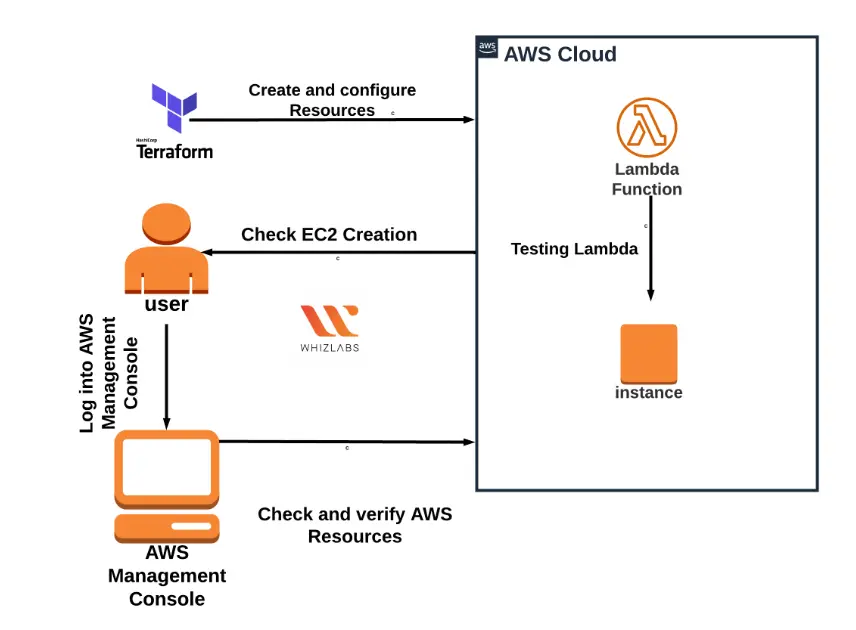
Tasks included
- Sign in to the AWS Management Console.
- Setting up Visual Studio Code
- Creating a variable file
- Creating a Lambda Function in the main.tf file
- Create an output file
- Confirmation of Terraform installation by checking the version.
- Applying Terraform configurations
- Checking the resources in the AWS Console
- Testing the Lambda Function.
- Checking EC2 Instance Creation
- Deletion of AWS Resources
This lab includes list of steps to create a NAT Gateway and permit the internet access to an Instance in a private subnet with usage of terraform.
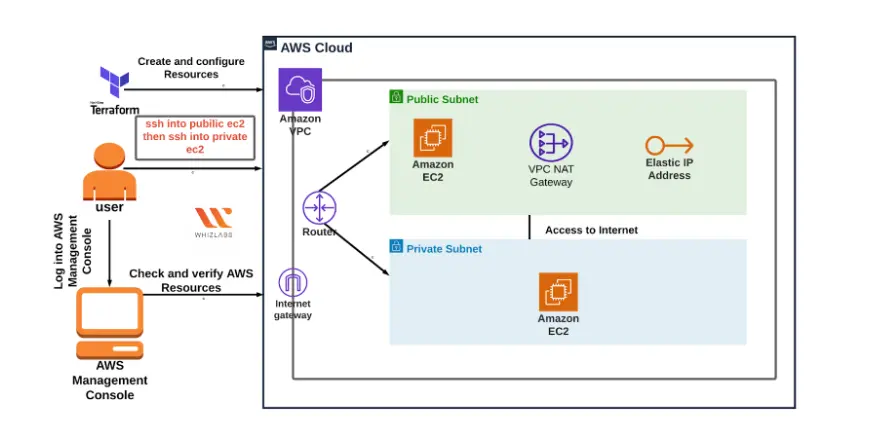
Tasks included
- Sign in to the AWS Management Console.
- Creation of a key pair
- Setting up Visual Studio Code
- Creating a variable file.
- Creating a VPC in the main.tf file
- Creating Public and Private Subnets in the main.tf file
- Creation of Internet Gateway in main.tf file
- Creation of a public route table and configuration done in main.tf file
- Launching the Public and Private Instances in the main.tf file
- Creating an output file
- Confirmation of Terraform installation by checking the version
- Applying the Terraform configurations
- Checking the resources in the AWS Console
- SSH into the public and Private EC2 instances and test the Internet Connectivity
- Creation of a NAT Gateway in the main.tf file
- Updating the Route table and configuration of the NAT Gateway in the main.tf file
- Testing the Internet connection from the Instance inside the Private Subnet
- Deletion of AWS Resources
This lab includes the steps to automate the EBS snapshot creation using CloudWatch and SNS.
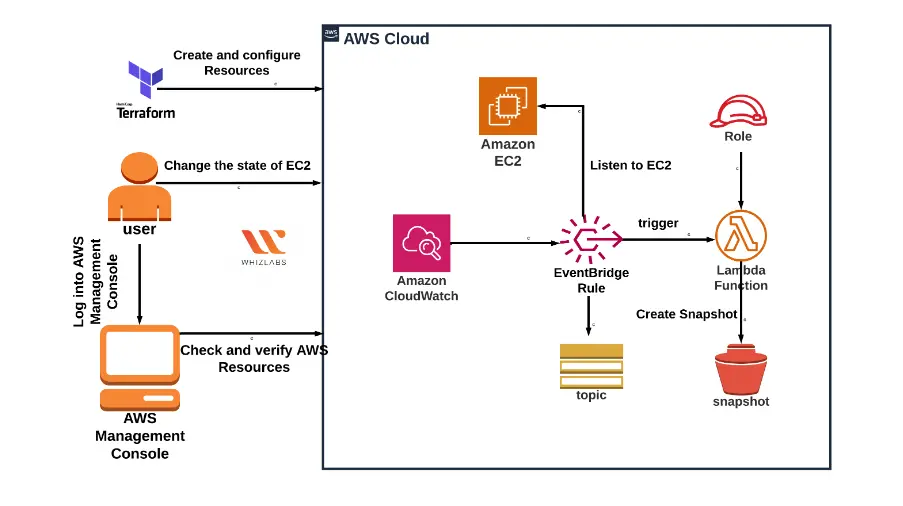
Tasks included
- Signing into the AWS Management Console.
- Setting up Visual Studio Code
- Creation of a variable file.
- Launching EC2 in the main.tf file
- Creating an SNS Topic in the main.tf file
- Create a Lambda Function in the main.tf file
- Create a CloudWatch Event Rule in the main.tf file
- Add an SNS destination to the Lambda in the main.tf file
- Add a CloudWatch Event Target to a Lambda in the main.tf file
- Create an output file
- Confirm the installation of Terraform by checking the version.
- Apply Terraform configurations
- Check the resources in the AWS Console
- Delete AWS Resources
In this lab, you can be able to create flow logs for an AWS VPC and VPS using Terraform by following the steps.
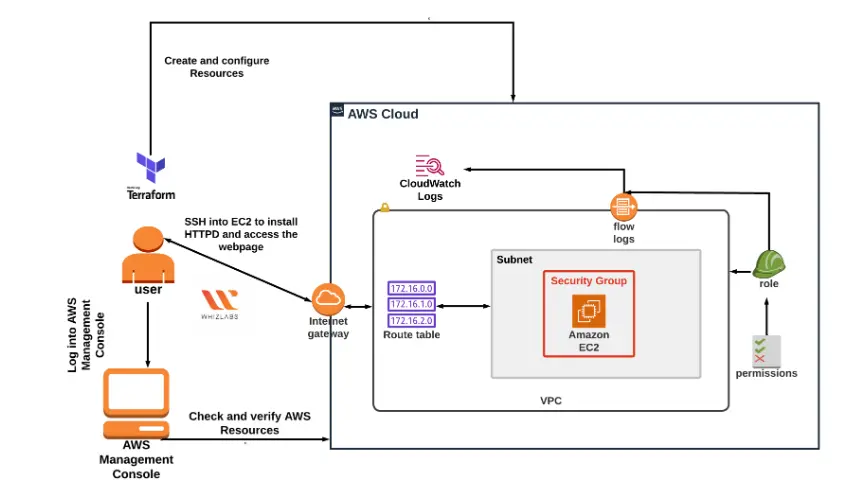
Tasks included
- Signing into the AWS Management Console.
- Setting up Visual Studio Code
- Creating a variable file
- Creating an IAM Role for EC2 in the main.tf file
- Creation of CloudWatch log group in the main.tf file
- Creating a VPC, Internet Gateway and Subnet in the main.tf file
- Creating VPC Flow Logs in the main.tf file
- Creating a Security group and Key pair for EC2 in the main.tf file
- Launching an EC2 Instance in the main.tf file
- Creating an output file
- Confirmation of Terraform installation by checking the version
- Applying the Terraform configurations
- Checking the resources in AWS Console
- Generating traffic
- Seeking log events in CloudWatch log groups.
- Deletion of AWS Resources
- Launching EC2 and RDS instances and connecting to the RDS Instance from EC2 Instance using Terraform
You will learn how to create an EC2 Instance and an RDS Instance and connect the RDS instance to the EC2 Instance.
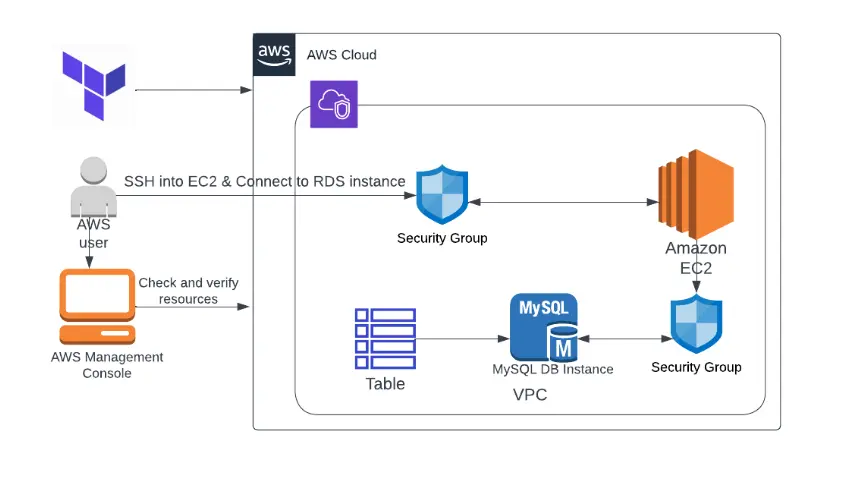
Tasks included
- Sign in to the AWS Management Console
- Setting up Visual Studio Code
- Create a variables file
- Creation of security group for RDS and EC2 in the main.tf file
- Adding an RDS Instance in the main.tf file
- Adding EC2 Instance creation in the main.tf file
- Creation of output file
- Applying Terraform configurations
- Checking that the resources exist in the AWS Console
- Creation of database, table and insertion of data for testing
- Deletion of the AWS Resources
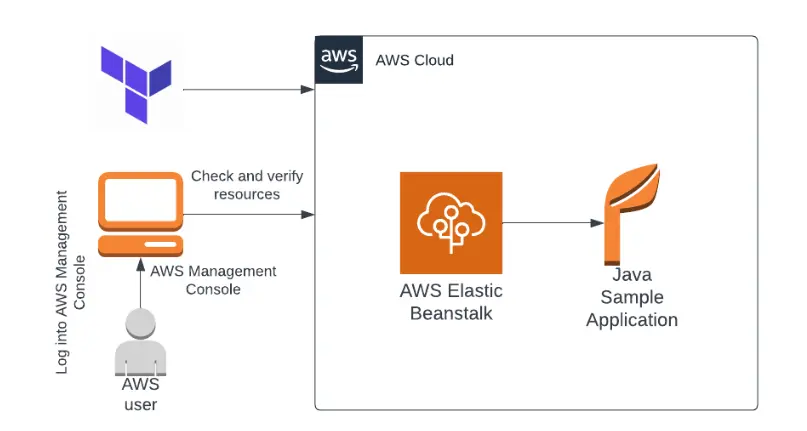
6. Creation of an Elastic Beanstalk Application using Terraform
This lab helps you to understand how the deployment of ElasticBeanstalk carries out with the usage of terraform. You will be able to deploy as well as manage Java applications in the AWS cloud in an easier way without considering the infrastructure-based application with the help of Terraform.
Tasks included
- Sign into the AWS Management Console.
- Setting up Visual Studio Code
- Creating variable file
- Creating Elastic BeanStalk Application in main.tf file

- Creating an Elastic environment in the main.tf file
- Create an output file
- Confirmation of Terraform installation by checking the version.
- Applying Terraform configurations
- Checking the resources in the AWS Console
- Testing Lambda Function.
- Checking EC2 Instance Creation
- Deletion of AWS Resources
7. Creation of an EventBridge Rule to know the data on EC2 Instance state change using Terraform
In this lab, you can see how we can deploy Elastic Beanstalk using Terraform. You can deploy and manage a Java application in the AWS Cloud in a quicker way without worrying about the infrastructure that runs applications with usage of Terraform.
Tasks included
- Sign in to the AWS Management Console.
- Setting up Visual Studio Code
- Creating a variable file
- Creating an Elastic Beanstalk application in the main.tf file
- Creating an Elastic environment in the main.tf file
- Create an output file
- Confirmation of Terraform installation by checking the version.
- Applying Terraform configurations
- Checking the resources in the AWS Console
- Testing Lambda Function.
- Checking EC2 Instance Creation
- Deletion of AWS Resources
8. Enabling public access to an S3 Object with usage of Terraform
This lab guides you through creating an S3 bucket and object as well as using Terraform to grant public access to the S3 object.
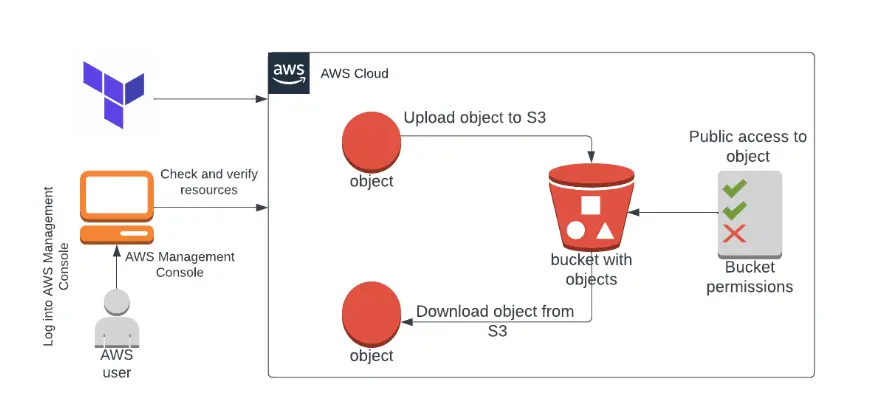
Tasks included
- Sign in to the AWS Management Console.
- Setting up Visual Studio Code
- Creating a variable file
- Creation of an S3 bucket in the main.tf file
- Uploading an image file to the S3 bucket in the main.tf file
- Creating an S3 bucket policy in the main.tf file
- Confirmation of Terraform installation by checking the version.
- Applying Terraform configurations
- Checking the resources in the AWS Console
- Testing Lambda Function.
- Checking EC2 Instance Creation
- Deletion of AWS Resources
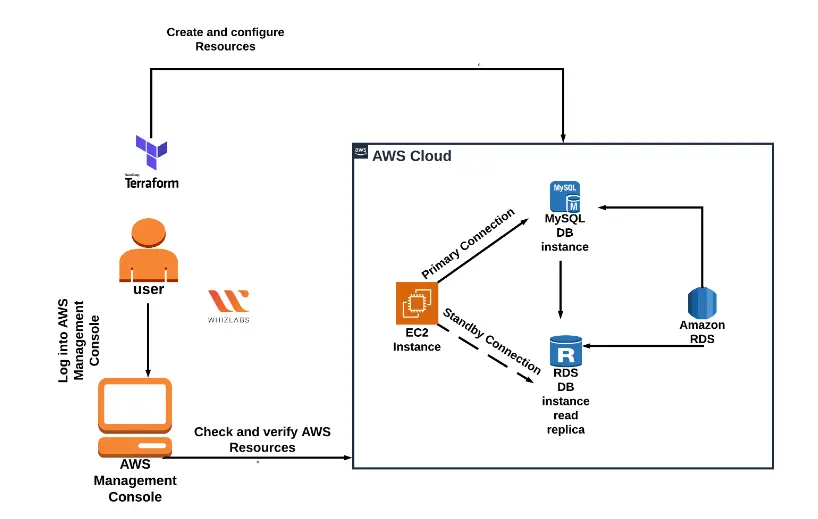
9. Launching an RDS Cluster with Multi-AZ Read Replica with usage of Terraform
This lab furnishes step-by-step guidance on how to set up an Amazon Aurora RDS DB instance with multi-AZ enabled using Terraform.
Tasks included
- Sign in to the AWS Management Console.
- Setting up Visual Studio Code
- Creation of a variable file.
- Creation of a security group and Key pair for EC2 in the main.tf file
- Setting up an EC2 Instance in the main.tf file
- Creation of a security group for RDS in the main.tf file

- Creation of the RDS Database DB Cluster and Instance in the main.tf file
- Creation of an output file
- Confirmation of Terraform installation by checking the version.
- Application of Terraform configurations
- Checking the resources in AWS Console
- Execution of Database Operations through SSH
- Deletion of AWS Resources
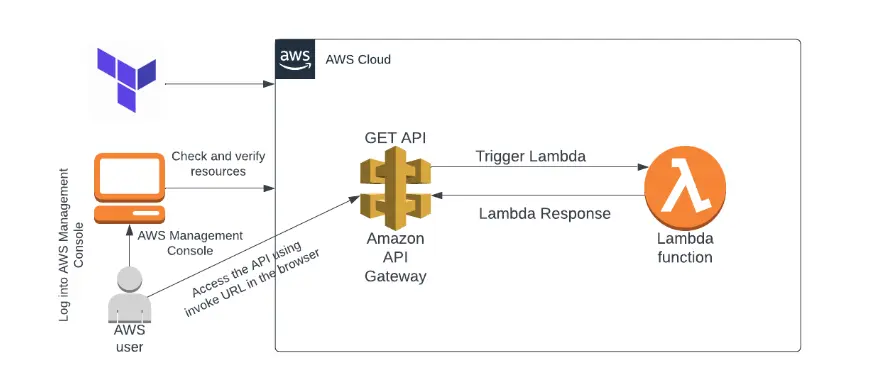
10. Build an API Gateway and integrate it with a Lambda function using Terraform
You will be guided through each step of creating an integration between an API Gateway and a Lambda function in this experiment.
Tasks included
- Need to sign in to the AWS Management Console first
- Set up Visual Studio Code
- Creating a variable file
- Create an IAM role for the Lambda in the main.tf file
- Create a Lambda function in the main.tf filetf file
- Creation of a REST API, its methods, and resources in the main.tf file
- Creation of gateway integration and deployment of the API in the main.tf file
- Creation of an output file
- Terraform installation confirmation process by checking the version.
- Applying Terraform configurations
- Checking the resources in the AWS Console
- Testing the Lambda Function.
- Checking the EC2 Instance Creation
- Removal of the AWS Resources
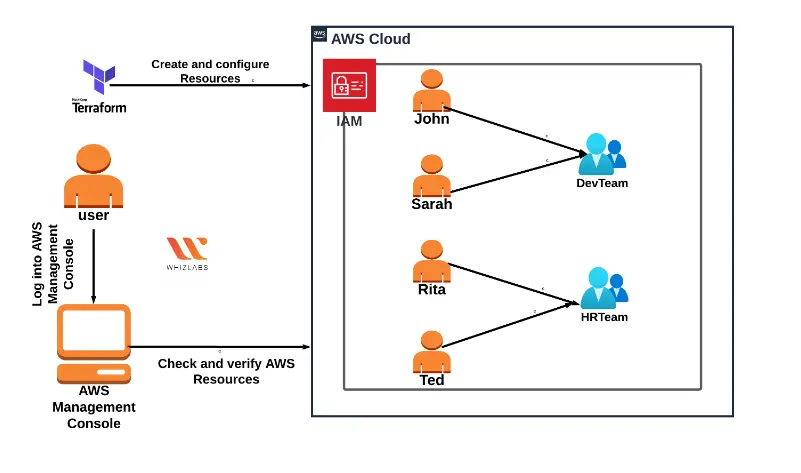
11. Create IAM Users and Groups using Terraform
This lab guides you through the process of using Terraform to create IAM Users and add them to IAM Groups.
Tasks included in this labs are:
- Register with the AWS Management Console.
- Installing Visual Studio Code
- Create a variable file
- Add IAM users to the main.tf file
- In the main.tf file, create an IAM group and add IAM users
- Make a file for output
- Verify Terraform’s installation by examining the version
- Put terraform configurations to use.
- In the AWS Console, look at the resources
- Removal of AWS Resources
Want to explore more labs?? Try out more hands-on labs and become a pro in Terraform.
Create a CloudFormation stack to deploy AWS Resources using Terraform
Create S3 Bucket lifecycle policy using Terraform
Manage AWS Auto Scaling using Terraform
Upgrade and downgrade an EC2 Instance type using Terraform
What are the benefits of taking the HashiCorp Terraform Associate Hands-On Labs?
The HashiCorp Certified: Terraform Associate – Hands-On Labs course is designed to provide hands-on experience with Terraform, a popular Infrastructure as Code (IaC) tool used to provision and manage infrastructure in the cloud. Some of the benefits of taking this course include:
- Learning best practices: The HashiCorp Certified: Terraform Associate Hands-on Labs course covers best practices for using Terraform to provision and manage infrastructure, which can help you to develop efficient and effective infrastructure automation workflows.
- Gain practical experience: Hands-on labs in this course provide hands-on experience with using Terraform to create and manage infrastructure in a cloud environment, which can help you to develop the skills necessary to create and manage infrastructure in real-world scenarios.
- Certification preparation: Hands-on labs is designed to prepare you for the HashiCorp Certified: Terraform Associate certification exam, which validates your knowledge of Terraform and your ability to use it to provision and manage infrastructure.
- Confidence in using Terraform: It can help you to develop confidence in using Terraform to provision and manage infrastructure, which can help you to be more productive and efficient in your work.
- Industry recognition: Earning the HashiCorp Certified: Terraform Associate certification can help to demonstrate your expertise in using Terraform, which can help you to stand out to potential employers or clients.
FAQs
How hard is HashiCorp Terraform Associate certification?
The Terraform Associate exam is not challenging; however, it heavily relies on practical Terraform expertise. Because of the numerous follow-along exercises and typical edge cases that you would only encounter in practice, this study course takes longer than 12 hours.
How long will it take to prepare for HashiCorp Terraform Associate Certification?
Despite the fact that everyone has a different learning style, on average, it shouldn’t take more than 50 hours to complete all of the modules and practice exercises.
Is the Terraform certificate valuable?
Terraform Associate is a well-known certification offered by HashiCorp, and it has successfully been used as a DevOps tool for building declarative Infrastructure as Code (IaC).
Is Terraform Associate certification worth it?
Yes, it is! Terraform ranks among the most frequently employed tools for organisations involved in cloud resource deployment. With a two-year validity period for the certification exam, it boasts an attractively affordable price point. Given its applicability to a diverse range of IT professionals, investing in this certification is a worthwhile endeavour.
Is Terraform Associate certification easy?
The Terraform Associate exam is not particularly challenging; instead, it places a significant emphasis on practical familiarity with Terraform. We have incorporated numerous hands-on labs and addressed typical real-world scenarios that you can only encounter through practical experience.
What is the HashiCorp-certified Terraform Associate exam code?
The exam code for HashiCorp Certified Terraform Associate is (004)
Summary
By completing hands-on labs, candidates can gain a better understanding of how to use Terraform to automate infrastructure provisioning and management and develop the skills needed to pass the HashiCorp Certified Terraform Associate Certification exam.
Hands-on labs are an effective way to prepare for the HashiCorp Certified Terraform Associate certification exam. These 30+ hands-on labs help you gain practical experience with Terraform and reinforce your knowledge of key concepts and skills required for the exam.
If you have any questions or need personal assistance in picking your certification path, email us at: [email protected]

- AWS Security Specialists: Essential in Modern Cybersecurity - August 16, 2024
- Cloud Developer Tools Showdown: AWS vs Azure vs GCP - August 14, 2024
- Master AWS Lambda and API Gateway for Application Development - August 6, 2024
- Benefits of AWS Developer Associate Certification which Can Boost Your Career - July 24, 2024
- Preparation Guide on Datadog Fundamentals Certification - July 17, 2024
- What is DLP in Power Automate? - June 5, 2024
- Top Data Engineering Certifications in 2024 - May 30, 2024
- How Difficult is Google Cloud DevOps Engineer Certification? - May 29, 2024