

Six weeks into your team’s cloud certification training program, your finance department forwards you a cloud invoice with a one-line question at the top: “What is the excess cloud cost?” It’s a couple of thousand dollars heavier than last month, and nobody can say why.
Two days of digging later, you have your answer. It’s a single instance, one of your cloud engineers spun up to practice for an exam and never switched off.
That invoice is the real cost of cloud training, and it’s the one no spreadsheet saw coming.
The exam fees were budgeted.
The study subscription was budgeted.
But this wasn’t, because it never looked like training. It looked like infrastructure.
Ask a manager what it costs to certify a team on the cloud, and the answer is tidy: exam fees, plus a subscription with video courses and practice tests. Multiply by headcount, send it for approval. It’s a fair number, and it isn’t wrong. It’s just the visible part, and the visible part is rarely what hurts.
Here’s what it leaves out.
A subscription full of videos and practice questions teaches the theory and checks whether it has stuck. What it can’t do is let anyone build anything real, and cloud certs are hands-on exams. They test whether your engineer can stand up a network, lock down access, and ship a working service, not whether they can spot the right answer out of four.
So the subscription stops exactly where the real preparation starts, and that practice has to run somewhere. Hand people a live cloud account to figure it out, and the meter starts running by the hour, with no ceiling and no one keeping an eye on it. The most expensive part of cloud training tends to be the part you never approved.
Before we add any of it up, though, it’s worth answering the question that usually gets skipped.
Why Cloud Certification Is Worth It for Your Team
When money gets tight, cloud certifications are usually one of the first things a team cuts – filed under “perk” rather than “priority.” That’s usually a mistake. Here’s why it’s worth protecting.
Cloud isn’t a side skill anymore. It’s what the business runs on. So when your team has gaps, you don’t just lose a bit of know-how; you pay for it every month. You overpay for infrastructure that nobody knows how to size correctly. Migrations drag because people are figuring things out on the live system. And you lean on contractors at four-figure day rates to do work your own team could handle. None of that shows up on a training budget, but the bills are real.
There’s also a reason that catches companies off guard. To reach the higher AWS, Microsoft, or Google partner tiers, you need a certain number of certified staff on the books. So certifications aren’t just a perk for your engineers. Sometimes they’re the only thing standing between you and a partner status, a customer’s requirement, or a deal you want to close. That one isn’t optional.
And then there’s the simplest reason of all: people stay where they’re growing. Give engineers the time and a clear path to certify, and they tend to stick around. Don’t, and they’ll find a company that will, taking everything they’ve learned with them. Training is cheaper than hiring a replacement.
So the real question isn’t whether to certify your team. It’s what it actually costs once you count everything. Which brings us back to that spreadsheet.
The True Cost of Cloud Training: What You See vs. What You Pay
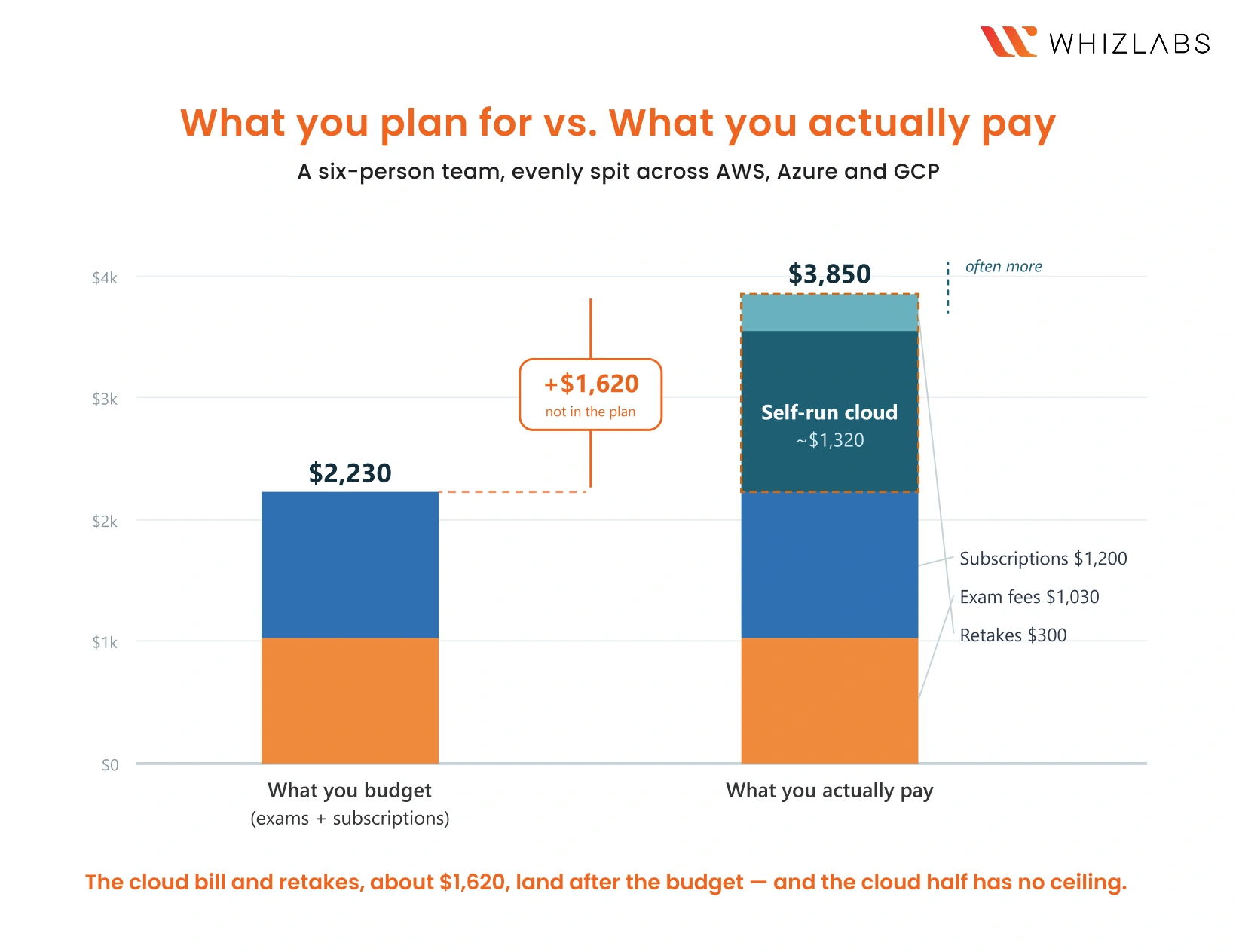
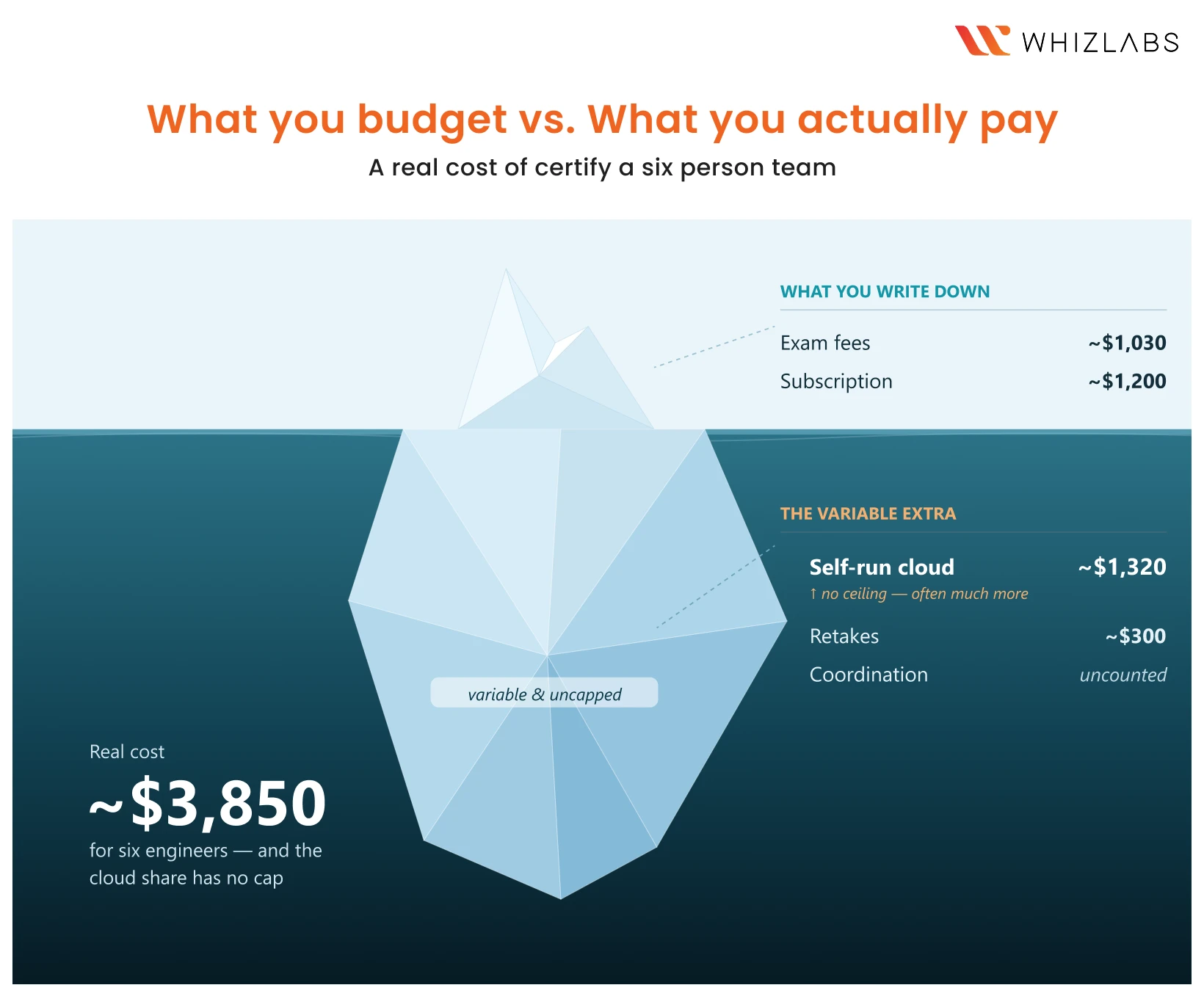
There are two budgets for any team training program: the one people present, and the one they actually live with. The difference isn’t that the hidden costs are enormous. It’s that they’re variable, uncapped, and land on someone other than the person who approved the budget.
| Cost line | Predictable? | Who notices |
|---|---|---|
| Exam/voucher fee | Yes, fixed | Finance |
| Video-and-practice-test subscription | Yes, fixed | Finance |
| Cloud bill from self-run practice | No — variable, no ceiling | The infra team, three weeks late |
| Retakes after failed attempts | No | The engineer, quietly |
| Coordination and tracking | No | The manager’s calendar |
The two fixed lines are the ones you budget. The three below them are the ones that decide whether the program comes in on plan, and the cloud bill is the one that can quietly run past everything else combined.
AWS, Azure & GCP Certification Exam Costs
Start with the easy part, because it’s the part everyone gets half-right. These are approximate US prices as of early 2026, and they do move, so treat them as a planning floor and confirm against each vendor’s official page before you lock a budget.
AWS. The foundational Cloud Practitioner sits around $100. Associate-level exams (Solutions Architect, Developer, SysOps) run about $150. The professional and specialty exams jump to roughly $300. Most teams cluster at the associate level, so $150 a head is a fair planning figure.
Azure. Microsoft tends to be a little cheaper at the entry point. Fundamentals (AZ-900) is around $99, and the associate-level role-based exams like AZ-104 are roughly $165. Azure also reshuffles its certification lineup more often than the others, so check the current role-based paths rather than assuming last year’s still exist.
GCP. Google’s Associate Cloud Engineer is about $125, and the professional tier (Cloud Architect, Data Engineer, and so on) runs around $200. Google leans harder on the professional certs than the other two, which nudges the average per-person cost up if that’s where your team is headed.
So far, so manageable. A handful of engineers at the associate level is a few hundred dollars in raw exam fees. If that were the whole story, nobody would need to read this far.
The Hidden Cloud Training Cost Nobody Budgets: Practice Infrastructure
Here’s the cost a study subscription quietly hands back to you.
You cannot pass a modern cloud cert by watching videos and grinding practice questions. The exams check whether your engineer can actually configure things, which means they need somewhere to build and break things safely. A subscription that’s only courses and practice tests doesn’t give them that, so the practice environment becomes your problem.
The usual answer is to hand everyone a live cloud account, which is exactly how that opening bill happens. And even when nobody forgets to shut anything down, you’re still paying by the hour for usage no one is tracking, and you’ve handed production-grade credentials to people who are, by definition, still learning what not to touch.
Budget $220 a head for it if you want a planning number, but understand what that number really is: an optimistic floor on a line with no ceiling. This is the one cost that turns a tidy budget into an open-ended one.
Then there are retakes. A meaningful share of first attempts fail. Depending on the cert and the preparation, first-time pass rates often sit in the 70 to 80 percent range, so on a small team, you should plan for at least one retake. Each retake is another exam fee and another round of preparation, and weak preparation, the kind that comes from theory without hands-on practice, is exactly what drives the retake rate up in the first place. The two hidden costs feed each other.
Cloud Training Cost Example: Per Engineer, and for a Team
Enough theory. Let’s price it from the bottom up, starting with a single engineer, because that’s the number that lines up against any per-seat plan you’ll compare against.
One engineer, the DIY way, all-in:
- Exam fee, one associate-level cert = ~$170 (varies $150–$200 by platform)
- Videos-and-practice-test subscription = ~$200
- Cloud spend for self-run practice = ~$220 (variable, often much more)
- Share of a retake = ~$50
That’s roughly $640 per engineer, and only $170 of it ( the exam) is truly fixed. The other ~$470 is what you spend getting them ready to pass. Most of that prep cost is replaceable: the subscription and the practice cloud come to about $420 together, and a single team plan can cover both. The practice cloud is also the only line here with no ceiling, which makes it the first one worth getting off your books.
Now scale it to a realistic small team: six engineers, evenly split across the three platforms.
- 2 × AWS Solutions Architect Associate at $150 = $300
- 2 × Azure AZ-104 at $165 = $330
- 2 × GCP Professional Cloud Architect at $200 = $400
- Exam fees subtotal = $1,030
- Subscriptions, ~$200 a head = $1,200
- Self-run cloud practice, ~$220 a head = $1,320
- One or two retakes = ~$300
A manager coordinating and chasing status for a quarter = real, and almost never counted
Real total: around $3,850. You budgeted $1,030 in exam fees; the program actually costs nearly four times that, and the fastest-growing piece of it is the cloud bill nobody set a limit on.
If that gap made you wince, it’s worth seeing what team pricing looks like before you finalize the budget.
Talk to us for a Custom Team Training Path
How Team Cloud Training Plans Lower the Real Cost
Look back at the per-engineer breakdown: about $470 on top of the exam, with roughly $420 of it (the subscription plus the practice cloud) being replaceable, and the cloud part of that carrying no ceiling. That’s the gap a real team plan closes, and it’s exactly where a plain videos-and-tests subscription leaves you exposed.
Here’s the distinction that matters. Most training subscriptions give you two things: video courses and practice tests. Useful, but they stop precisely where the real cost begins. Practice infrastructure is left to you, which means the variable cloud bill is left to you, and the under-prepared retakes come back to you.
The way we built team training at Whizlabs starts from the opposite end:
Hands-on labs and sandboxes are included – and so is the cloud cost. Your engineers practice in real environments we provide, not in cloud accounts you have to open, monitor, and pay for by the hour. That alone removes the most dangerous line in your budget.
There’s no forgotten instance running over the weekend, no surprise four-figure bill, no handing out production credentials. And because the practice is real, the hours your engineers invest turn into passes instead of retakes.
The cloud cost is fixed, not metered. This is the part that changes the budget math the most. We cover the cloud infrastructure behind the labs regardless of how much your team uses it.
The single most unpredictable, usage-driven cost in the whole exercise becomes a known number you can put in a budget and defend, instead of an open meter you find out about after the fact.
An admin dashboard handles the coordination. You can see who’s enrolled, who’s progressing, and who’s stalled, which is the data finance always asks for, and what a manager usually does by hand.
Now put it against that ~$420 of replaceable cost per engineer. A Whizlabs seat covers all of it – the courses, the practice tests, and the hands-on labs – for one fixed price, with three ways to buy depending on how your team is shaped:
[IMAGE 3: Plans Comparison]
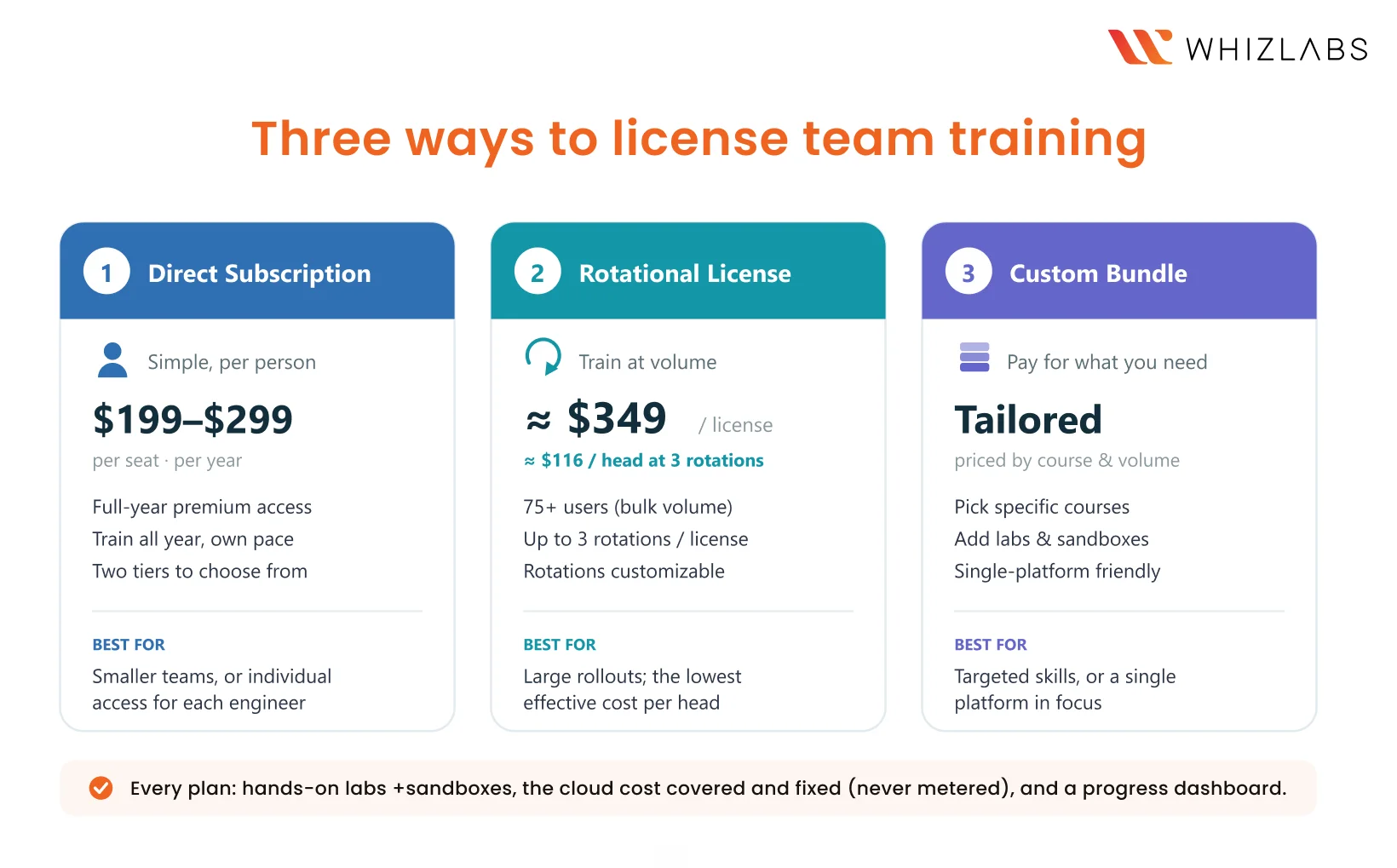
- Direct subscription — the simplest path. A straight per-seat annual subscription, $199 or $299 per person for the year, depending on tier, with full premium access plus the hands-on labs and sandboxes. Set that against the ~$420 you were going to spend per engineer on a subscription and self-run cloud – except your $420 came with an open-ended cloud meter, and this is a fixed number that already includes the practice environment. You pay less, and the variable risk is simply gone. Cleanest fit for smaller teams, or when everyone’s on their own schedule.
- Rotational license — for training at volume. Instead of one license per person, a single license is reused across timelines to train people in sequence, with up to three rotations as standard, and the count is customizable to your cohorts. At bulk volume (think more than 75 users), that’s a ballpark of $349 per license, and because each one covers multiple people, the effective per-head cost drops to around $116 – below even the bare subscription line in the DIY budget, with labs and fixed cloud cost included. This is the one that kills per-seat waste.
- Custom bundle – pay only for what you need. Bundle specific courses, or specific labs and sandboxes, and pay only for those. Fully customized, so pricing tracks the courses and volume you actually need. The right call when your team needs a targeted set of skills or is focused on one platform.
The exam fees you pay either way. What a team plan changes is everything stacked around them: the subscription becomes more capable, the open-ended cloud bill becomes a fixed line, and better hands-on preparation pulls the retake rate down.
The Cost of an Undertrained Cloud Team
One more number, because the real comparison isn’t training versus zero. It’s training versus the cost of an undertrained team.
A team that doesn’t know the cost-optimization tooling over-provisions infrastructure, and a 20 to 30 percent overspend on a monthly cloud bill will dwarf any training budget within a quarter. Skills gaps get patched with contractors at a thousand dollars a day and up. Migrations run slow because people are learning on the live system. And the engineers who wanted to grow and weren’t given the chance go find it elsewhere. Against all of that, a structured certification program is one of the cheaper line items you’ll approve this year. It just doesn’t look that way if the only number you’ve written down is the exam fee.
How to Budget for Cloud Training
If you take one thing from this: plan for the practice, not just the exams. The fees and the subscriptions are trivial and predictable. The practice environment is where the budget really lives, and it’s the line that goes from an open-ended cloud meter to a fixed, covered number the moment labs and sandboxes are included rather than left to you.
That’s the gap Whizlabs is built to close. Every plan runs on real cloud environments with hands-on labs and sandboxes built in, and the cloud cost behind them is covered and fixed on our side, never metered on yours, so the one line with no ceiling in a DIY budget simply isn’t there.
An admin dashboard shows who’s enrolled, who’s progressing, and who’s stalled, which is the reporting finance asks for and the status-chasing a manager would otherwise do by hand. And because there are three ways to buy it (a direct subscription, a rotational license, or a custom bundle), the spend tracks your team’s size and target certs instead of a one-size license you only half use.
So price out your team the honest way, per engineer and then across the headcount, and put that number next to a Whizlabs plan. We’ll work out which of the three models fits your team and target certs, and walk you through the labs and the dashboard for your specific setup, so you’re comparing one fixed, all-in figure against the DIY route you were about to budget for, uncapped cloud bill and all.
