

Cloud platforms already offer free tier accounts. So when does a sandbox become the better way to practice?
When you start learning cloud, the obvious first step seems to be signing up for a free account on AWS, Azure or GCP. It is free and it is right there. But free does not always mean easy to practice and for many learners, that difference becomes a frustration as they go further with free personal cloud accounts.
This is not an argument against personal cloud accounts. They have their place and we will get to that. But for a growing number of developers, learners and researchers, a sandbox is simply the smarter way to practice. But first, what is a sandbox?
What is a sandbox?
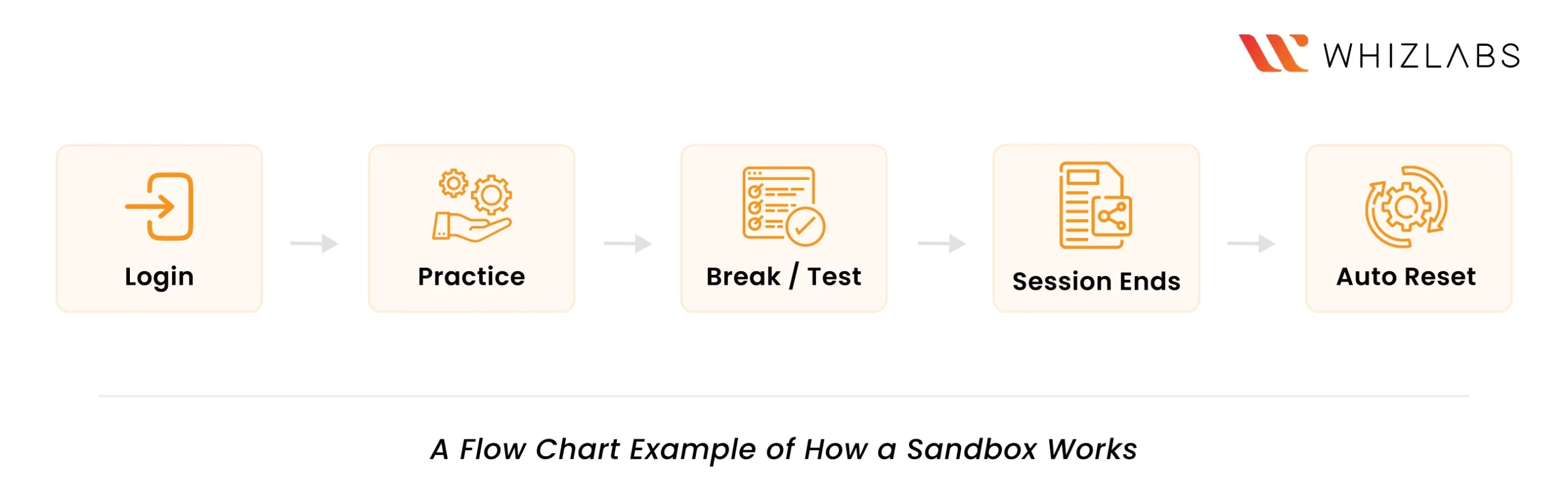
A sandbox is a safe, isolated environment where you can practice without worrying about affecting live systems or incurring unexpected costs.
The name comes from a child’s sandbox, where you can dig, experiment, and make a mess without consequences.
In cloud learning, this usually means a pre-configured environment with temporary access to services like AWS, Azure, or GCP, where you can test deployments. Every time the session ends, the environment resets.
That reset cleans up resources, closes all gateways, and helps prevent excess billing.
Sandboxes are one of the best cloud training alternatives to personal trial accounts, especially for certification-focused learners.
What is a free personal cloud account?
A free personal cloud account is an account you create directly with a cloud provider like AWS, Azure or GCP. These accounts come with a free tier that includes a 12 month trial period for certain services. After that, standard pricing applies. You own the account, you manage it and everything that happens inside it is your responsibility.
Is a free personal cloud account really free?
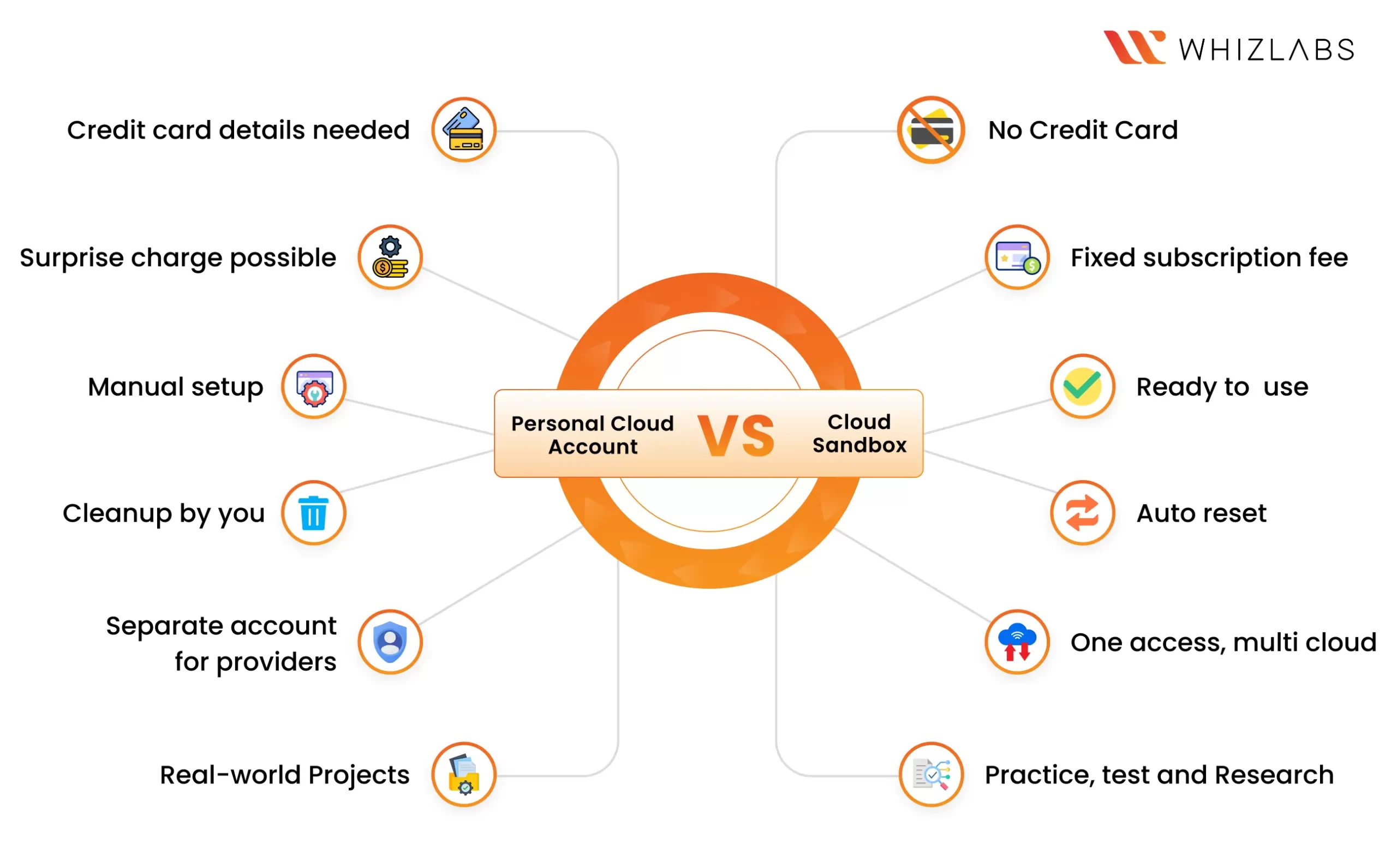
You can absolutely start practicing on a free tier account. But if you accidentally leave a resource running overnight, you will wake up to a billing nightmare. Here are some pointers for you to consider if you are choosing a personal cloud account.
- The free tier has limits. Only certain services are free and when you exceed them, you have to pay. Beginners often don’t realize this until the bill arrives.
- You need a credit card on file. This is a real psychological and practical barrier for many learners.
- Resource cleanup is your responsibility. If you forget to close an instance or a gateway, it can rack up charges overnight. This happens more often than you expect.
- Account management takes time. Time spent on account setup, billing alerts, and IAM configuration is time not spent learning.
- Multi-cloud learning means multiple accounts. If you’re practicing across AWS, Azure and GCP, you need three separate accounts.
“A personal account can be cheaper if you’re disciplined, experienced enough to manage cloud costs, and only need one provider. For everyone else, the math changes quickly.”
Benefits of a Cloud Sandbox
A cloud sandbox removes the operational friction that often slows down learning.
You are not spending time setting up accounts, adding payment details, configuring billing alerts, or worrying about whether a resource is still running in the background.
The environment is already prepared for practice.
No credit card or billing setup required
You do not need to link a payment method. There are no usage limits to track and no additional charges when a session goes wrong.
The environment is ready when you log in
There is nothing to set up before you begin. The cloud environment is already prepared, so you can start learning the moment you log in.
Mistakes do not carry over
This is one of the biggest advantages of a sandbox. If something breaks or a configuration goes wrong, the environment resets after the session, giving you a clean start next time.
One subscription covers multiple cloud platforms
You can practice on AWS, Azure and GCP without creating and managing separate accounts for each.
All of this means one thing – when you log into a sandbox, you are already practicing.
Not ready for open practice yet? Whizlab’s guided hands-on labs can walk you through real projects and exam scenarios step by step inside the same sandbox environment.
Where Sandboxes Clearly Win
Exam Preparation
Starting from a blank personal cloud account means you need to spend time on configuration before practicing a single concept.
For certifications like Microsoft Power BI Data Analyst Exam (PL-300), Microsoft Azure Administrator Associate (AZ-104), or AWS Certified Security – Specialty (SCS-C03), learners need specific scenario-based practice such as:
- configure IAM roles
- create VNets / VPCs
- set policies
- monitor logs
- troubleshoot access issues
Sandboxes offer pre-configured environments built around exactly these scenarios. So when you use a sandbox for exam preparation, you spend your time practicing, not setting up.
And when you need to repeat a scenario, the environment resets cleanly every time. You do not manually undo configurations or remove leftover resources from the previous session.
Additionally, sandbox sessions are time-bound by nature. Exams are time-bound too, and learning to work within a clock is part of being ready.
Cloud learning platforms like Whizlabs go a step further by building hands-on guided labs directly around certification objectives. These labs offer step-by-step instructions to help you practice for your exams.
Development
Enterprises use sandboxes as a simulation environment. In enterprises, no team tests a new update or application directly in production. They need a safe, isolated environment that doesn’t affect their live system. A sandbox mirrors the enterprise live environment closely enough to test and practice the new application.
For developers learning services independently or exploring a new software for the first time, Whizlabs sandbox gives you that enterprise simulation environment without generating “bill shocks.”
Upskilling
A University Student who has spent a semester studying VPCs, IAM and storage services cannot fully understand these concepts without practicing in a real environment.
Enterprise L&D teams run upskilling training programs for entire departments. The teams need to track completion, measure outcomes and evaluate performance consistently across every learner.
Billing Risks: In both cases, learners cannot accidentally leave an environment running or generate unexpected charges.
The Scale Problem: Spinning up personal cloud accounts for fifty employees or a hundred students is an administrative nightmare. It means procurement approvals, compliance checks, billing setup and account management across every single learner before anyone has practiced anything.
Where Sandboxes Step In: A sandbox removes these setbacks entirely, every learner gets the same environment to practice without a single credit card or account setup required. No one is held back by billing confusion or environment differences. As already mentioned, with a sandbox, there are no accidental extra charges as all the sessions are reset on completion.
Security Research
Cybersecurity researchers need an isolated environment, not just for convenience or practice, but as a standard requirement to do their jobs. You don’t want a penetration exercise bleeding into a real environment.
A sandbox provides that isolation by default. Researchers can test and break systems without any consequences.
The ability to reset the environment after every session also makes it easier to repeat the same tests and study specific attack scenarios thoroughly.
So, who actually needs a personal cloud account?
There are some people for whom a personal cloud account is the right environment to build. They are usually not learners but someone who tries to manage cloud.
- Developers building portfolio projects need to experience real deployments, CI/CD pipelines, domain configurations and production-like scenarios.
- People pursuing cloud architecture roles need to understand cost management, billing dashboards and account structure from the inside.
- Freelancers and consultants will manage client accounts, so hands-on account-level experience matters.
Final thoughts
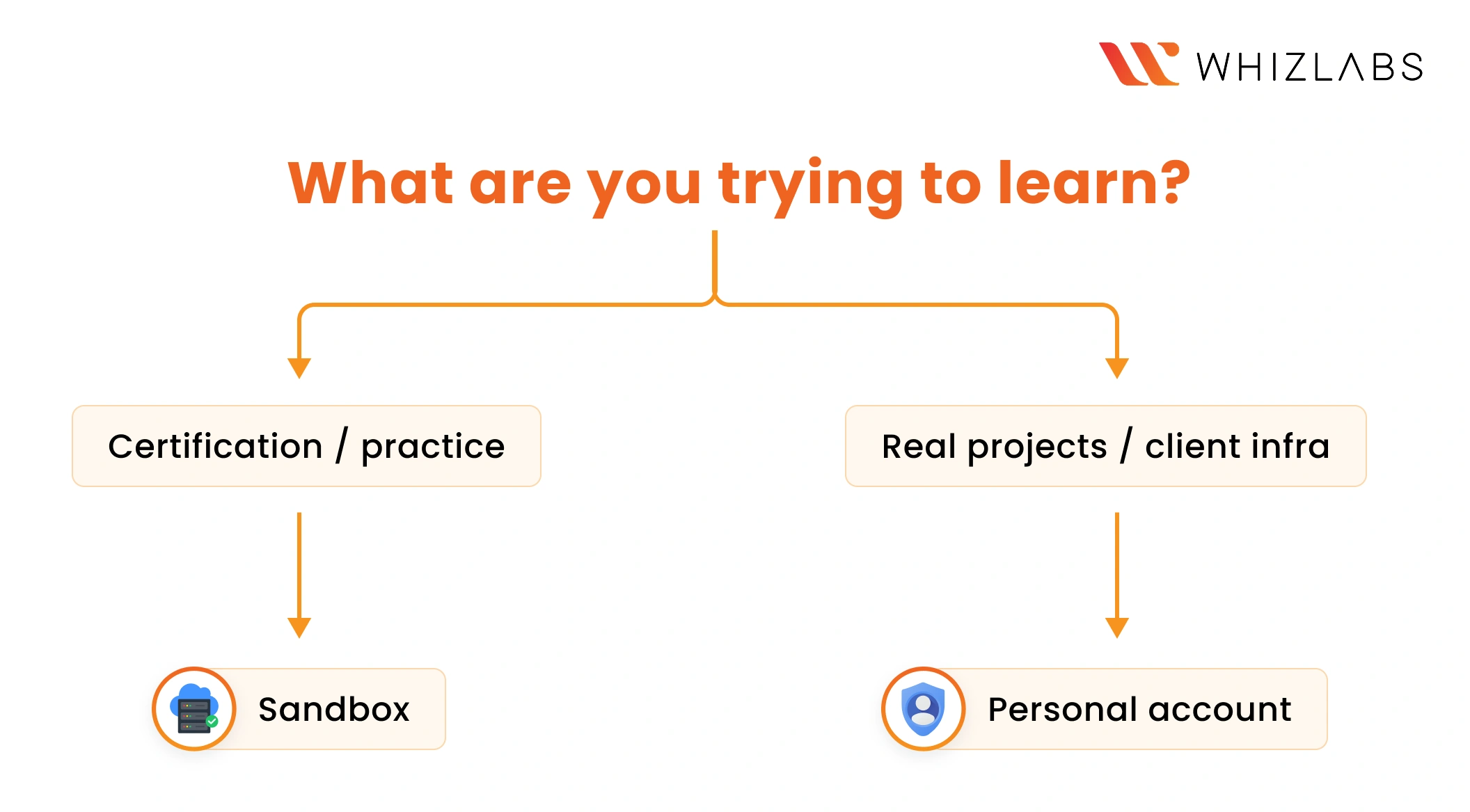
Answer this: “Are you practicing cloud, or learning to manage cloud?”
If you are building real projects, managing client infrastructure or preparing for an architecture role, create a personal cloud account because that is where that experience lives.
But if you are learning cloud for an exam, exploring a new service, training a team or researching security vulnerabilities, you do not need the overhead of a personal cloud account. You need a safe, ready environment where the only thing you focus on is learning.
Start exploring sandboxes with Whizlabs.
Cloud sandboxes and personal cloud accounts solve different learning needs. So understand that they are not competing choices.
Still have questions? Drop us an email at [email protected]. We will sort it out.

- GCP Agentic Architect Exam Guide: Format, Domains, and Beta vs GA (2026) - September 30, 2026
- AIP-C01 Sample Questions and Answers: Scenario-Based Practice - September 16, 2026
- Databricks Certified Generative AI Engineer Associate Exam Guide (2026) - August 4, 2026
- 10 AWS Security Projects SCS-C03 Candidates Should Build - July 10, 2026
- Microsoft’s Latest AI Launches: Are We In the Agent Era? - June 26, 2026
- What Career Does MLA-C01 Lead To? Read This Before You Start - June 18, 2026
- What Is Agentic AI? And Why NCP-AAI Is the Cert for It - June 4, 2026
- Who Should Take AB-100 Certification? Beginner or Professional? - May 14, 2026